Apple Wallet pass integration: build the lifecycle behind the design
- Product engineering
- Apple Wallet
- Mobile development

An Apple Wallet pass can make a ticket or membership card easier to find. The harder product work starts after the pass looks right: who may receive it, what happens when a booking changes, how a scanner decides it is valid and what a customer does when their phone or connection fails.
Apple’s Pass Designer is a useful prompt to revisit that journey. For a venue, membership business or booking product, the opportunity is a simpler customer experience with a reliable operational system behind it. This guide explains what to scope before adding Apple Wallet integration to a website or app.
What Apple Pass Designer changes
Apple’s Pass Designer announcement page describes a visual tool for creating and previewing Wallet passes. It supports templates, editable fields, colors, validation and semantic tags. The page says previews use the same rendering as iOS and watchOS, and that the beta requires macOS 27 or later. Those are tool capabilities and a development requirement, not a promise about your ticketing backend.
The Hacker News discussion raises a broader product question. Commenters describe frustration with mandatory ticketing apps, poor connectivity and difficult ticket sharing. Their experiences are useful research prompts, not a representative survey. A Wallet button may reduce friction, but only if the issuance, access and fallback paths are designed with equal care.
The rest of this article is Curiosive’s implementation guidance. The examples describe possible designs for an event or membership product; they are not customer case studies or claims about measured conversion gains.
Separate the pass from the entitlement
A pass is a presentation of information and a way to carry a credential. The entitlement is the underlying right to enter an event, use a membership or redeem an offer. Keep that right in the business system that owns bookings or memberships. A customer’s displayed pass should not become your only record of whether their access is valid.
For an illustrative venue, the booking record might be active, canceled, transferred or redeemed. A corresponding pass can display the relevant date, seat and reference. The check-in system should decide whether admission is allowed from the booking rules. This separation becomes important when the displayed pass is stale, duplicated or associated with a refunded booking.
Apple’s pass-building documentation explains that distributed passes are signed bundles. Each pass combines a pass type identifier and a serial number; the same pair identifies an updated version. Signing establishes the bundle’s provenance. It does not, by itself, decide who currently owns a ticket or whether a barcode has already been redeemed.
Before development, write down which system owns each fact. A booking system owns event access, a membership system owns eligibility and a redemption ledger owns whether a one-time benefit has been used. The pass should carry the minimum information needed to support that journey.
Map the full Apple Wallet pass lifecycle
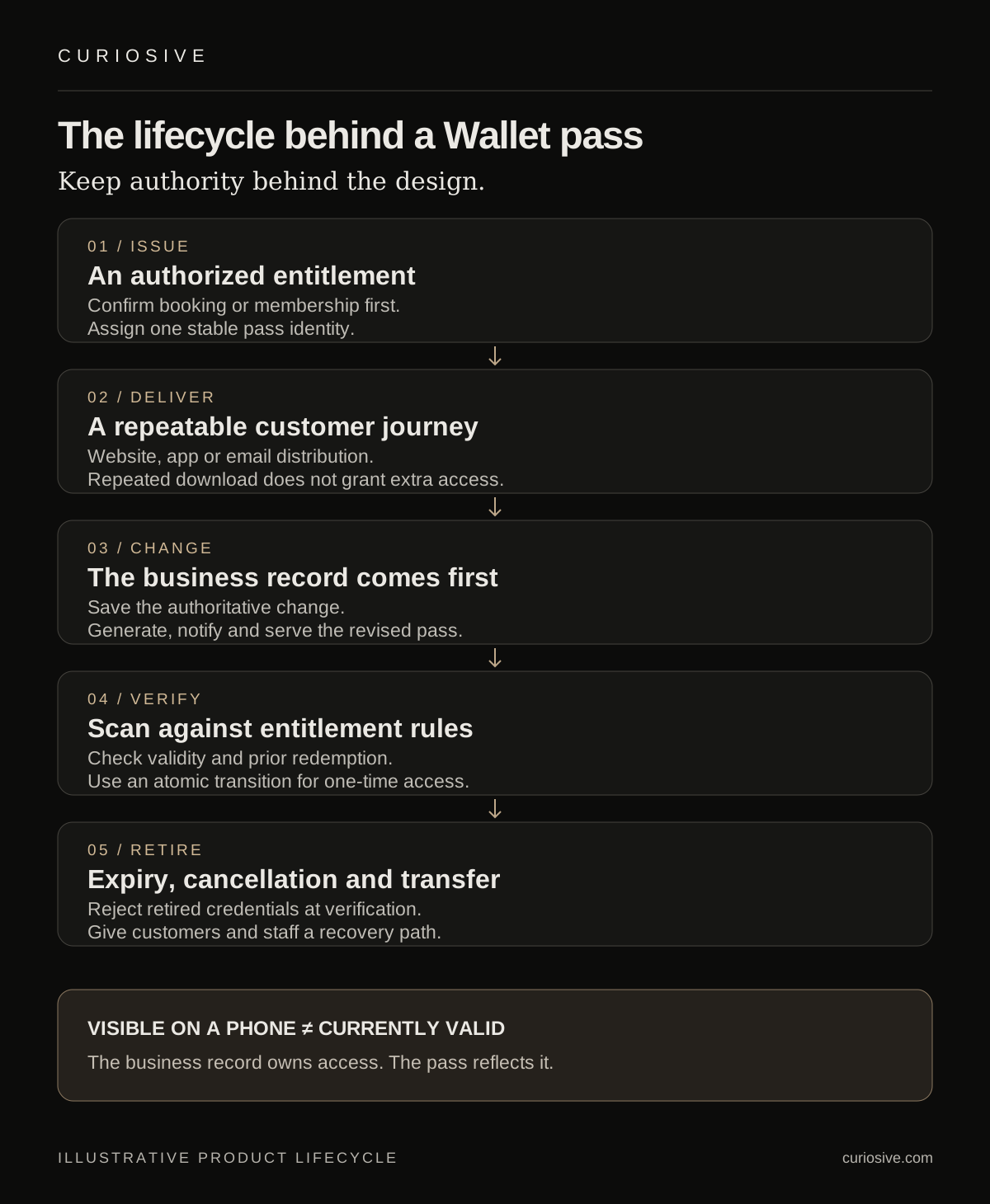
Scope at least five stages: issue, deliver, change, verify and retire. Each stage needs an owner and a user-visible recovery path. A polished add-to-Wallet flow is only the delivery stage.
Issuance should follow an authorized event, such as a confirmed booking. Generate a stable pass identity and associate it with the correct business record. If a customer retries the download, return the same logical pass rather than creating another entitlement. If a ticket can be transferred, decide what changes in the booking record and how the previous holder’s credential stops working.
Apple documents distribution through apps, websites and email attachments. A business can therefore consider a web-based add-to-Wallet journey without first building an entire customer app. Whether that is sufficient depends on the rest of the product: account access, transfers, support and the devices customers use.
For ongoing changes, Apple’s pass update web service involves device registration, a push notification and a device request for updated content. That is a cooperative process, not a direct database write into every customer’s phone. Treat a last-minute update as a notification workflow that needs observation and support, rather than assuming every installed pass immediately reflects the new state.
Design redemption before choosing the barcode
Start with the decision the scanner must make. Is it looking up an active membership, consuming a one-time ticket or applying a limited offer? Those are different rules. Choose the credential format after the rule is clear.
For a connected one-time redemption flow, a scanner can submit an opaque credential to the backend. The backend verifies its scope and applies an atomic transition from unused to redeemed. Two concurrent scans should not both consume the same entitlement. Return an explicit reason when the credential is already used, canceled or unknown, and give staff a safe way to escalate a dispute.
This is an illustrative design, not a prescribed Apple API. The useful distinction is that copying a visual barcode should not create a second valid booking. Avoid encoding unnecessary personal information in a code that may be screenshotted, forwarded or visible to other people in a queue.
If offline scanning is required, define the trade-off openly. A local verifier or cached admission list can check some facts without a network, but disconnected scanners cannot automatically share the latest redemption or cancellation state. Decide how to synchronize, resolve conflicting scans and limit the exposure before launch. Offline availability and instant global revocation are separate requirements.
Keep updates consistent with the business record
The database transition should come first. A cancellation or seat change updates the authoritative record; a pass update reflects that change. If generating or delivering the new pass fails, the business state still needs to be correct and visible to support staff.
Use a durable job for pass generation and notifications when the product requires retries. Record which revision was generated and make retrying safe. A delayed notification should not overwrite a newer booking change. Distinguish “change saved,” “updated pass generated” and “notification attempted” in internal tools; those events describe different parts of the lifecycle.
Plan credential retirement explicitly. A canceled ticket may remain visible on a device. The scanner must enforce cancellation from the authoritative system when connected, and staff need a clear fallback when offline. For membership cards, specify expiry, grace periods and reinstatement rather than treating every state as simply active or inactive.
Treat signing and updates as maintained infrastructure
Someone must own the signing certificate, private key and renewal process. Keep signing material out of browser code and source control. Restrict the service that uses it, monitor upcoming expiry and test the renewal procedure before it becomes urgent. A working design file does not cover this operational responsibility.
Apple requires HTTPS for a production pass update web service and describes authentication for its update endpoints. Follow those requirements, then consider the surrounding application as well: booking permissions, support roles, rate limits and logging. Do not put sensitive pass authentication values into routine analytics or copy them into support screenshots.
Pass registration records and push tokens also need a retention plan. Decide which records support staff can access, how deleted accounts affect stored associations and what should be retained for reconciliation. Collect enough evidence to diagnose delivery and redemption failures without collecting every detail about a customer’s device or activity.
Make the customer fallback part of the feature
A user should be able to find a booking without installing a new app or learning a new account system just to see a ticket they already bought, where the business rules allow it. Keep a clear web receipt or account view, and explain where the Wallet option fits.
Provide an equivalent path for customers who do not use Apple Wallet. Depending on the product, that could be another wallet format, a printable credential or a staffed lookup using an appropriate booking reference. Test these paths against the same entitlement rules. A fallback should not silently bypass one-time redemption or cancellation checks.
Accessibility also reaches beyond the pass artwork. Use clear field labels, useful text alternatives on the website and instructions that work without relying on a tiny icon or color. At a venue, staff should be able to explain a rejected scan without exposing another customer’s information. The recovery journey matters most when the queue is moving and the customer is stressed.
What to include in an integration brief
Before asking an engineering team for an estimate, describe the pass type, source system and redemption rules. Include the states that change the credential and the existing scanners or staff tools it must work with. Device compatibility, barcode reading and connectivity need testing in the actual operating environment.
- Business source of truth: which booking, membership or loyalty record determines access?
- Delivery channels: website, app, email or a combination, with equivalent customer fallbacks.
- Lifecycle changes: cancellation, transfer, expiry, seat changes and recovery after failed delivery.
- Verification rules: connected or offline scanning, duplicate use and staff escalation.
- Operations: signing ownership, renewal, update jobs, monitoring and support visibility.
Pilot the entire lifecycle with a narrow use case. Test repeated downloads, two simultaneous scans, a cancellation just before admission, expired signing material in a safe test environment and a device that misses an update. These tests say more about readiness than a perfect screenshot.
Build a better journey around the pass
If Wallet integration belongs in your booking or membership product, start with the customer journey and operational rules. Explore Curiosive’s mobile app development work and website and CMS engineering, or tell us about the system your pass needs to connect to.
Bring the current purchase or membership flow, the verification environment and the situations that cause support requests. They make the scope concrete and help distinguish a design task from an integration that needs ongoing backend ownership.
Sources and scope
Sources read on 2 October 2026: Apple Pass Designer, the Hacker News discussion, and Apple’s documentation for building, distributing and updating passes. Product recommendations and illustrative designs are Curiosive’s analysis. Tool requirements can change; check Apple’s current documentation before implementation.
Frequently asked questions
Does Apple Pass Designer replace a ticketing backend?
It helps create and preview pass designs. The business still needs a system for bookings or memberships, authorized issuance, signing, delivery, updates and verification of the underlying entitlement.
Can a website distribute Apple Wallet passes without a dedicated app?
Apple documents website downloads and email attachments as pass distribution methods. A web-based flow can be an option, but it still needs signed passes and a customer journey suited to the product.
Does a signed pass prevent duplicate redemption?
Signing establishes the pass bundle’s provenance. One-time redemption must also be enforced by the verification system, including a rule for simultaneous scans and any offline operating constraints.
What happens when a Wallet pass is out of date?
Keep the business record authoritative. Pass updates involve device cooperation, so connected verification should enforce current entitlement rules even when a displayed pass is stale. Define offline and support fallbacks explicitly.
Put this into practice
Explore the services related to this article.
A short note about the product, the timeline and who it is for is enough to start. You will hear back from the engineer who would do the work, not a sales team.
Start a partnership