Guardrails for AI Coding Agents: Roles, Hooks and Isolation
- AI Coding Agents
- Developer Workflow
- Code Quality
- Web Development
AI coding agents fail in a predictable way. Left alone in one long conversation, they drift: the context fills up, features nobody asked for appear, and a risky command runs because nothing stopped it. Prompting harder does not fix this. Structure does. Below are the mechanisms we use to keep agent-assisted work predictable on web projects.
Start with a scoped plan and verifiable milestones
Before any code is generated, the requirements need to exist in writing. A useful pattern is to describe the goal loosely, then ask the agent to question you until the requirements are clear, working in a planning mode that cannot edit files. The result should be a plan split into milestones, each small enough to build and verify separately.
Scope needs an explicit boundary. Say which features are out of scope, and name the stack decisions up front (framework, backend, media handling) rather than letting the agent choose. Read the plan before building. A wrong assumption is cheapest to fix at this stage.
The same discipline applies to design. Ask for a style guide page first, with tokens, typography and core components, then review it before real pages are built. Consistency comes from reusable components, not from repeated prompting.
Give each job its own agent, skill and context
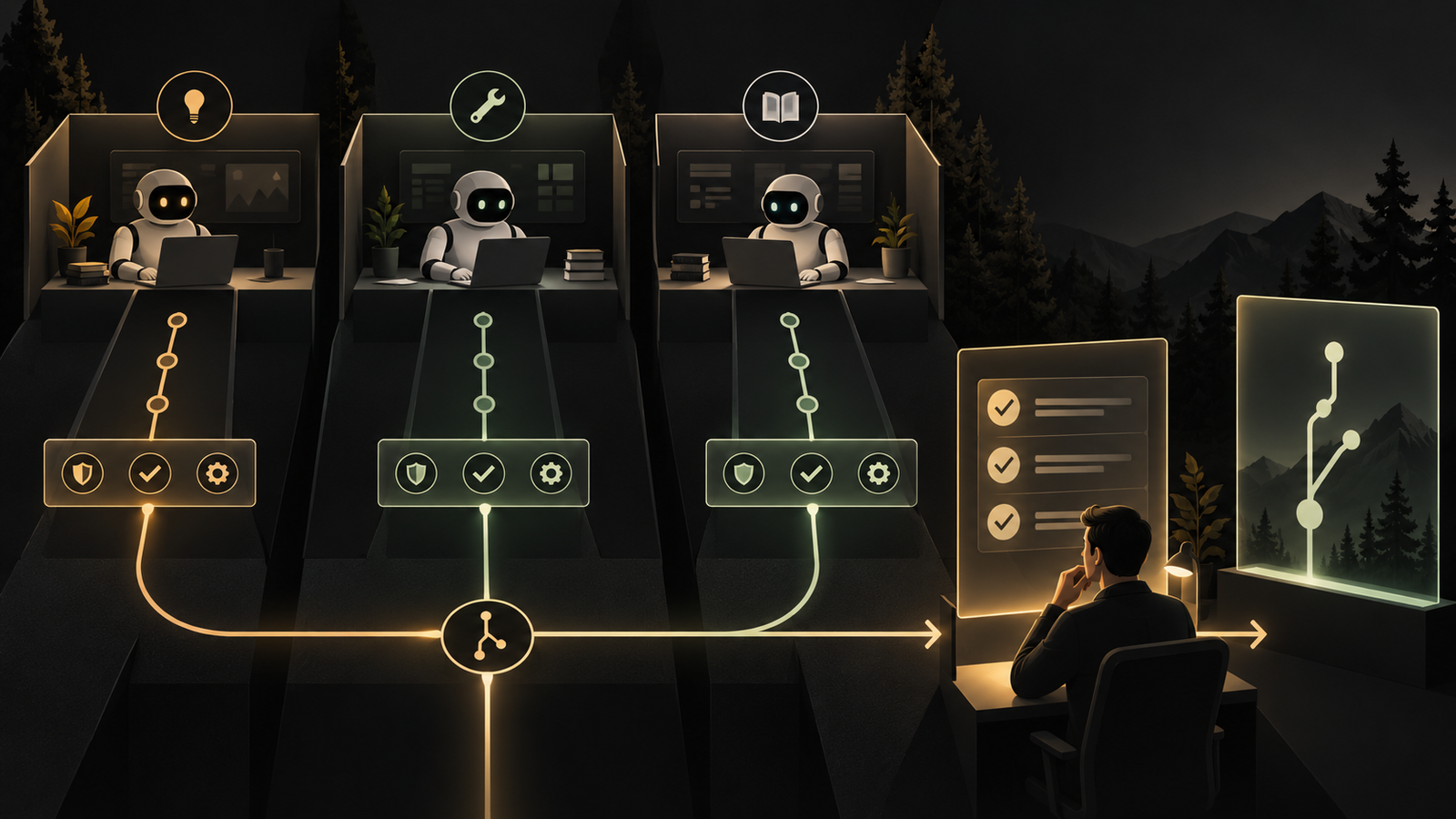
Long threads degrade as the context window fills. Custom sub-agents help: each is a markdown file with a name, a description, the tools it may use, and optionally a cheaper model. A reviewer or debugger agent works in its own context window and returns only its conclusion to the main thread, which stays lean.
Skills are the reusable counterpart: written procedures for workflows such as deploying. Only the name and description are visible until a skill is needed. For dangerous procedures like a rollback, a setting can stop the model from invoking the skill by itself, so a person must trigger it deliberately.
Enforce rules with hooks, worktrees and checkpoints
Instructions in a prompt are advisory. Hooks are enforceable. They run a script on lifecycle events, for example formatting every file after an edit, or inspecting a command before it runs and blocking it when the script exits with a specific code. Formatting and dangerous-command blocking then happen every time, without anyone remembering to ask.
Parallel work needs isolation. A worktree gives each agent its own copy of the repository, so a bug fix and a new feature cannot overwrite each other. Merge the results afterwards, and have someone check that nothing was lost.
Mistakes still happen, so make them cheap to undo. Checkpoints let a session rewind code and conversation to an earlier step. Named sessions can be resumed later, and a conversation can be branched to try a risky rewrite without touching the main line. A non-interactive mode also lets an agent run inside scripts, with permissions restricted to read-only tools where appropriate.
What this means for web teams
None of this replaces engineering judgment. It moves judgment to where it is cheapest: a reviewed plan, narrow agent roles, automated checks and reversible steps. When an agent misbehaves, describe the symptom precisely rather than guessing. Teams that treat agent setup as part of the project, not an afterthought, spend less time cleaning up and more time shipping work that senior engineers can review with confidence.
Frequently asked questions
How do you stop an AI coding agent from running dangerous commands?
Use hooks that inspect a command before it runs and block it when a script exits with a specific code. Because the check is automated, it happens every time rather than depending on the prompt.
Why use sub-agents for code review with AI?
Sub-agents keep the main conversation lean. Each one works in its own context window with a limited set of tools and returns only its conclusion to the main thread.
How can multiple AI agents work on the same repository safely?
Give each agent its own worktree, an isolated copy of the repository. A bug fix and a new feature then cannot overwrite each other, and the results are merged afterwards with a check that nothing was lost.
How do you undo a bad change made by an AI coding agent?
Use checkpoints to rewind code and conversation to an earlier step. Sessions can also be named, resumed later or branched, so a risky rewrite does not touch the main line.
What should a plan for an AI-built web app include?
It should include explicit scope, named stack decisions and milestones that can each be built and verified separately. Features that are out of scope should be stated so the agent does not add them.
Put this into practice
Explore the services related to this article.
A short note about the product, the timeline and who it is for is enough to start. You will hear back from the engineer who would do the work, not a sales team.
Start a partnership