Next.js Server Actions or API Routes: How to Choose
- Next.js
- Server Actions
- Web Architecture
- React
A single 'add post' button should not need a route file, a hand-built fetch call, JSON headers, two loading flags and a manual refetch. Yet that is exactly what many Next.js codebases carry for every small mutation. Server actions promise to remove that plumbing. They do, but only if the team understands where they fit and where they do not.
What server actions actually change
A server action is an async function that runs on the server and is called from the interface like a normal function. Under the hood it is still HTTP. Actions are invoked with POST requests only, so it helps to design them as mutations rather than as general data access.
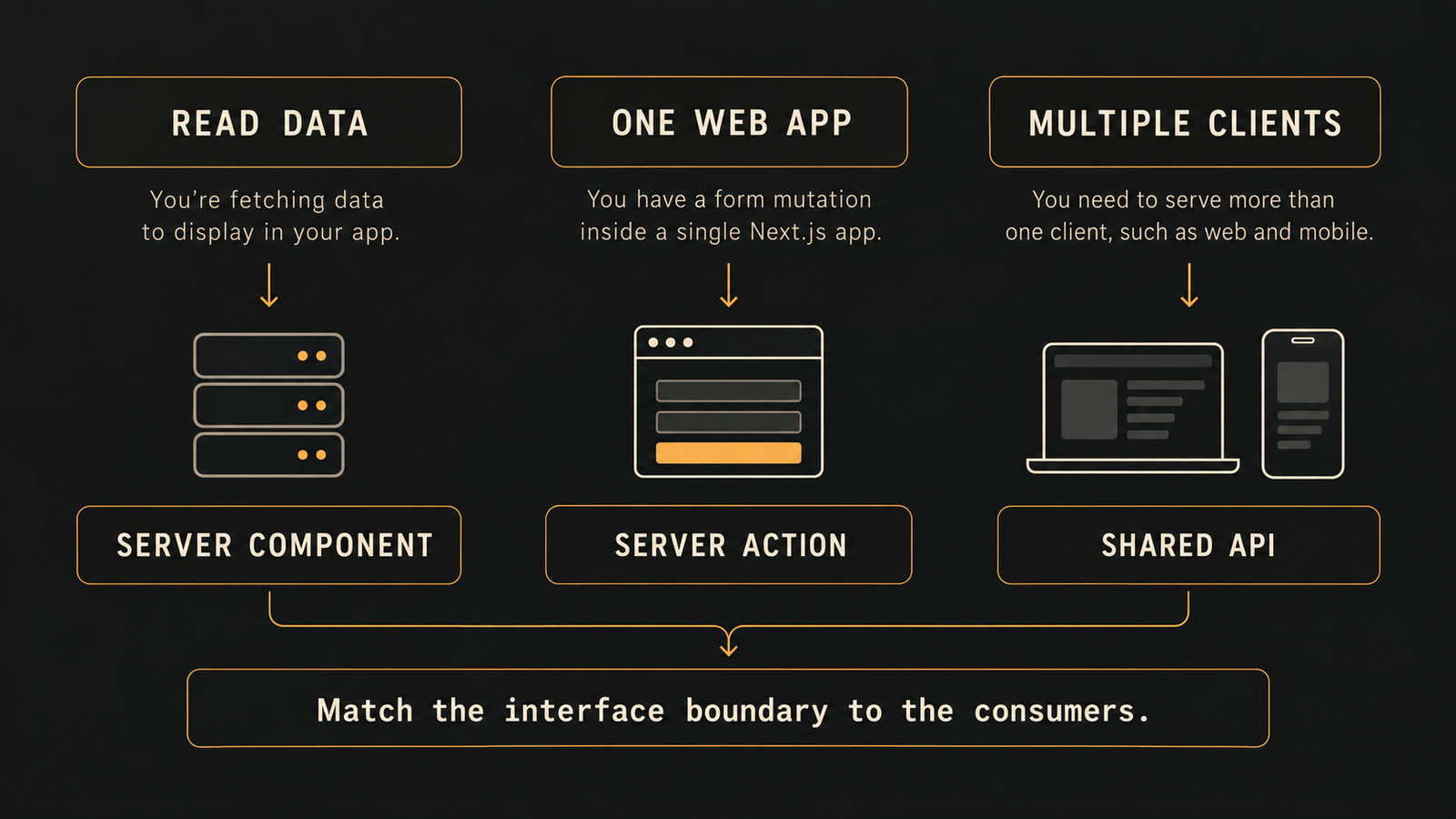
That boundary matters. Reads belong in server components and ordinary server-side data fetching. Calling an action just to read data adds an extra hop for no gain.
Used as a form action, the function receives the submitted form data, and the mutation logic sits next to the interface that triggers it. Forms built this way are progressively enhanced, so a submit can still reach the server while JavaScript is slow to load.
Getting a production-grade mutation right
A working form is not yet a finished feature. We treat four details as required:
- Server-side validation. A required attribute in the browser is only a baseline. The server writes the data, so it must validate it, for example with a schema library such as Zod, and return a predictable error shape that the interface can render field by field.
- Pending feedback. Without it, users double submit on slow connections. The form status hook only works inside a client component, so the submit button usually becomes its own small client component. Combine it with the action state hook to show errors and disable inputs during submission.
- Safe identifiers. For rows in a list, bind the record id into the action instead of trusting a hidden input. The id then comes from your own data.
- Cache awareness. When a mutation succeeds but the screen looks stale, the cause is usually cached server output, not a broken action. Revalidate the affected path or tag, refresh the route, or redirect.
One trap deserves attention. A redirect works by throwing a control flow exception that Next.js catches, so code placed after it never runs and it should not be wrapped in a try and catch block. Revalidate first, then redirect.
When an API layer is the better choice
Server actions are at their best inside a single Next.js application. The picture changes once other clients need the same logic, such as a separate admin site or a companion mobile app. Logic locked inside actions then has to be duplicated or refactored into a shared API.
Path-based revalidation is also coarse, because it refreshes everything on that route. Tag-based caching is more granular, but it takes deliberate setup. For interaction-heavy screens, some teams prefer client-side fetching behind a typed API layer, which keeps end-to-end type safety while serving several clients from one set of procedures. We would weigh that choice per product rather than adopt it as a rule.
A practical rule for product teams
We default to server actions for form-style mutations that belong to one web application, and we add an explicit API layer as soon as a second consumer is on the roadmap. Deciding early costs little. Migrating later means rewriting every mutation. If you are scoping a new product, asking 'who else will call this logic?' is one of the cheapest architecture questions you can answer up front.
Frequently asked questions
Should I use server actions or API routes in Next.js?
Use server actions for form-style mutations that belong to a single Next.js application, and add an API layer when other clients such as a mobile app or admin site need the same logic.
Can I use a Next.js server action to fetch data?
You can, but it is not recommended because actions are invoked with POST and are meant for mutations. Reads belong in server components and normal server-side data fetching.
Why does my page not update after a server action runs?
The page is usually showing cached server output. Revalidate the affected path or tag, refresh the route, or redirect after the mutation to show fresh data.
Do server actions need server-side validation?
Yes, because browser attributes like required only provide a baseline. The server writes the data, so it should validate with a schema and return a predictable error shape.
Why can't I call redirect inside a try and catch block in a server action?
Redirect works by throwing a control flow exception that Next.js catches, so code after it never runs. Revalidate first, then redirect, outside any try and catch block.
Put this into practice
Explore the services related to this article.
A short note about the product, the timeline and who it is for is enough to start. You will hear back from the engineer who would do the work, not a sales team.
Start a partnership