Client credentials in AI coding-agent history: a practical agency workflow
- Agency workflow
- AI coding agents
- Credential handling

An AI coding agent can help implement a client integration without needing the credential itself in a prompt. Yet a terminal command, verbose log or copied support message can put that credential into conversation history. The application may work correctly while an additional sensitive copy remains outside its intended storage location.
For agencies using AI-assisted development, this is a concrete delivery concern: identify where client credentials are used, prevent unnecessary exposure in tool output and respond accurately when a copy is found. The workflow below is recommended guidance, not a Curiosive security audit, client incident or tested evaluation of Agent Scrub.
The news context: coding-agent history is another data surface
Agent Scrub’s repository describes a macOS tool that scans coding-agent conversation files for potential secrets and can redact local copies. Its scope includes prompts, transcripts, tool output and saved memory. It deliberately excludes active credential stores and project environment files. The documentation says processing is local, redaction changes original files without automatic undo, and it cannot remove information already sent to a provider or copied into backups.
The creator submitted it to Show HN on October 2, 2026. Those are documented capabilities and limits, reviewed on October 3; they are not independently verified detection results. The useful agency lesson is broader than this particular tool: a credential inventory should distinguish the active secret from incidental copies created during development.
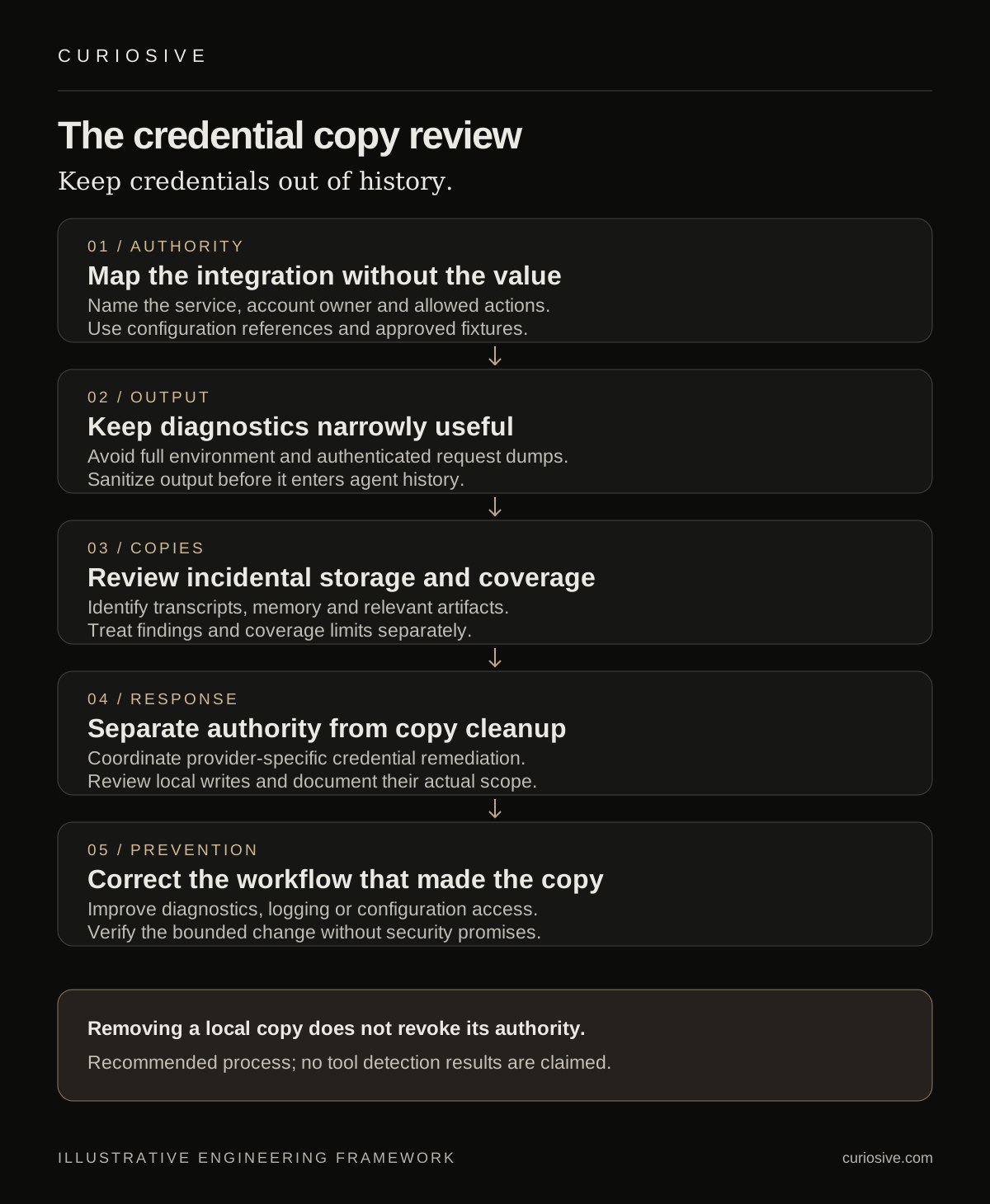
Map the integration without revealing the credential
Start with the service, account owner, development environment and permitted actions. Record a reference to the secret’s approved storage location, rather than its value. The AI agent needs to understand which variable an integration reads, what the client allows and how failure should appear. It often does not need to inspect the token bytes.
An illustrative task is implementing a connector against a test service. The agent can prepare an adapter using an agreed environment variable name and a fixture that represents the response. An authorized operator supplies the credential through the chosen storage mechanism. Runtime access and the permitted environment should follow the project’s actual requirements.
Keep client projects distinct. A reusable adapter can be shared without copying account credentials or client records into another engagement. Identify which permissions the integration needs and who can change them. A successful request establishes one working operation; it does not show that the credential has an appropriate scope for every future task.
Review commands and diagnostic output before they enter history
Consider what a troubleshooting command will print. Reading an entire environment file, dumping request headers or enabling verbose authentication logs may expose more than the task requires. Prefer narrowly targeted checks that report whether configuration exists, whether authentication succeeded and which non-sensitive condition failed.
Avoid constructing diagnostics by pasting credentials into command text. Sensitive values can appear in places beyond the agent transcript, including command history or logs. Use the project’s approved runtime configuration and make diagnostic output deliberate. Where a result needs redaction, handle it before it becomes the agent’s input or a shared screenshot.
For an API failure, a status code, request identifier and sanitized error category may be enough to guide the next investigation. Do not place a full authenticated request into the conversation merely because it is convenient. If deeper inspection is necessary, define an authorized method and the information that can be retained.
Include incidental copies in the review scope
Repository secret scanning and agent-history review cover different surfaces. A clean source tree does not describe every transcript, local memory file, terminal capture or uploaded troubleshooting artifact. List the locations relevant to the tools actually used on the project and identify what cannot be inspected.
If a scanner is used, review its findings and coverage. A detected string might be a fixture or a real credential; absence of findings may reflect unsupported formats, inaccessible files or detection limits. Do not turn a clean report into an assurance that no sensitive copy exists.
Agent Scrub is a timely example of this distinction, but this article does not recommend installing it as a universal solution. An agency should assess the tool and its write behavior before allowing changes to development history. The client-facing record can describe reviewed locations and unresolved coverage without including the secret itself.
Separate credential remediation from copy cleanup
If a credential has actually been exposed, deleting one copy does not revoke the authority it grants. Determine the affected service and account owner, the likely exposure boundary and the supported remediation path. Coordinate changes to dependent services so the response does not silently break the integration.
GitHub’s guidance for repository secret-scanning alerts treats a committed secret as compromised. It recommends replacing compromised GitHub tokens, updating dependent services and reviewing security logs where supported. That guidance concerns repository exposure; it should not be presented as proof that every local scanner finding represents the same incident.
For confirmed exposure elsewhere, follow the credential provider’s documented process with the account owner. Keep decisions about revocation, rotation and service updates distinct from local redaction. Record the decision and completed actions without reproducing the value in a ticket or progress report. This article does not inspect client credentials or perform incident response.
Treat local redaction as a controlled change
History files may contain useful evidence as well as sensitive data. Establish the authorized scope before modifying them, review potential impact and use an available preview or dry run. Consider ongoing agent sessions and the supported file formats. An automated write should not be described as harmless merely because it happens locally.
After cleanup, verify the reviewed locations and document what remains outside the scope. Provider-side records, shared copies and backups may require separate handling. Do not create a new uncontrolled archive of sensitive originals simply to preserve an easy undo path; follow the project’s approved handling requirements.
The operational record should identify findings, decisions, reviewed locations and limitations. Avoid claims such as “all copies removed” unless the scope and evidence support them. A precise statement about a bounded local review is more useful than a broad security promise.
Build prevention into the next development task
Use the findings to change the workflow that created the copy: a narrower diagnostic, sanitized adapter logging, a test fixture or clearer instructions about configuration access. This is where AI-assisted engineering can help implement a concrete correction while a responsible person reviews its behavior.
For future tasks, give the agent the integration contract and variable names, approved sample responses and the expected error states. Keep credential values in the designated mechanism and make the boundary explicit. Review secret handling as part of the integration, alongside the model and system architecture.
Need to define a clearer credential boundary for an AI-assisted integration? Contact Curiosive with the service, environment and intended actions, without sending credentials. We can discuss an appropriate scope through our AI integration services and existing service terms.
Frequently asked questions
Does removing a credential from agent history revoke it?
No. Local copy cleanup and credential authority are separate. Confirmed exposure needs the provider-specific remediation process with the account owner.
Does a clean source repository cover agent transcripts?
No. Repository scanning and local agent-history review cover different locations and have their own detection and access limits.
Did Curiosive test Agent Scrub for this article?
No. The article reviews its documentation and proposes an agency workflow; it reports no detection benchmark or client incident.
Put this into practice
Explore the services related to this article.
A short note about the product, the timeline and who it is for is enough to start. You will hear back from the engineer who would do the work, not a sales team.
Start a partnership