FLUX 3 Image: build a controllable AI asset workflow for your product
- AI integration
- AI image generation
- Product development

AI image generation is becoming more useful for product teams when it offers control over the composition, not only an impressive first result. A website hero, campaign card or in-product illustration has constraints: a subject must sit in the right place, important content must survive cropping, and approved elements must remain consistent across variants.
FLUX 3 Image’s emphasis on bounding boxes and targeted edits makes that change worth examining. For a client buying AI-accelerated development, the opportunity is a better asset workflow inside a real product: faster exploration with visible controls, followed by review and predictable publishing. The model’s capabilities are inputs to that workflow, not a substitute for it.
What FLUX 3 Image documents
Black Forest Labs’ model page presents generation from text, layout control with bounding boxes, targeted edits and multi-reference composition. Its API overview documents up to ten reference images, configurable aspect ratios and resolution, and an asynchronous result that the client polls. It also describes web grounding as enabled by default.
The vendor’s release notes date FLUX 3 Image to 1 October 2026. The HN submission was posted that day UTC. Its discussion includes interest in composition controls and differing preferences about creative interfaces. We verified the documentation on 3 October and are not treating HN reactions as a measured quality or speed comparison.
These are documented vendor capabilities, not results from a Curiosive FLUX 3 evaluation. The workflow below is our analysis of how a product team could use controllable generation. The accompanying artwork is a separate editorial illustration, not a FLUX 3 benchmark sample.
Turn the asset brief into explicit constraints
A useful generation brief identifies the asset’s job. A marketing hero might need room for a live headline and button. A learning product might need one recognizable object with a quiet background. A campaign workflow might need several variants that retain an approved visual identity.
Translate those needs into constraints the application can inspect. Record the target dimensions, safe regions, permitted references and the elements that must appear. Specify what can change between variants and what should remain consistent. A model prompt can express these choices, but the product should preserve them as editable data.
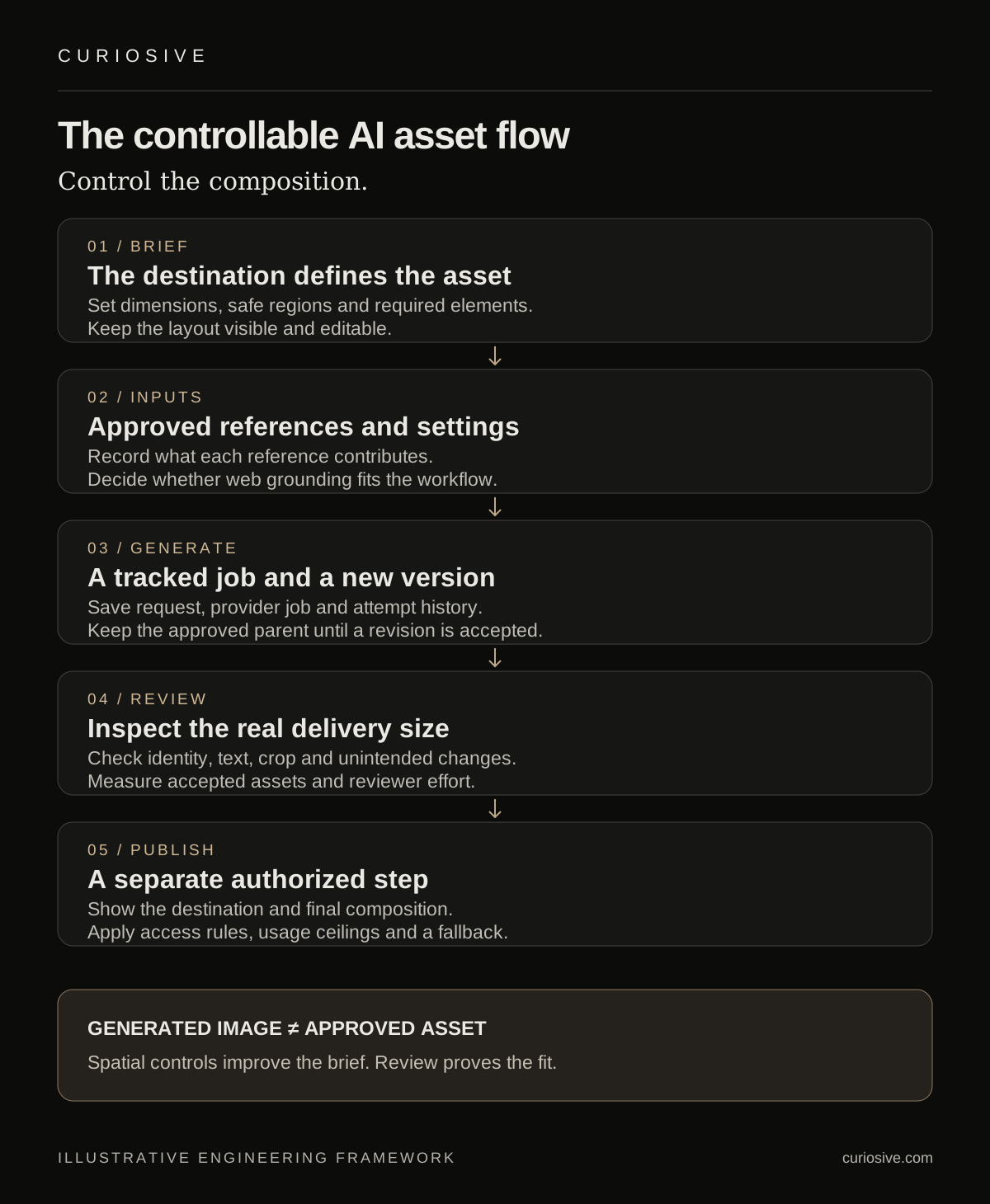
For an illustrative asset generator, let a reviewer place the subject region and reserve space for the site’s text. Store the layout with the request. If the model returns an attractive image with a face behind the button, the result should still fail the asset brief.
Keep critical UI text in the application where practical. A generated background and an HTML headline can be composed together without asking an image model to produce the final accessible interface. If an exported raster card includes text, inspect every word at the final size and provide an appropriate text alternative where it is published.
Treat layout control as a product interface
Bounding boxes can give a user or an agent a more specific way to request composition. That creates a design opportunity: people can adjust the part they care about instead of rewriting a long prompt and hoping the whole image stays stable.
The application still needs understandable controls. A buyer may think in terms of “leave room for the headline” rather than coordinates. Show the intended layout on the canvas, label important regions and provide a way to preview the actual destination crop.
An AI agent can propose a layout from a brief, but keep the proposal visible and editable. Validate the layout format before sending it to a provider. Check that regions are within the canvas and that required elements have stable identifiers. A malformed or conflicting layout should produce an actionable correction rather than a costly sequence of blind retries.
Preserve the distinction between intent and output. A locked region in a request records what should stay stable; the returned image still needs inspection. The editing guide says pixels outside boxes usually remain unchanged, while nearby lighting, shadows or reflections may change. It also warns that very small boxes can fail. Those limits belong in the review criteria; targeted editing is not a promise of exact preservation in every result.
Handle references as governed inputs
Reference images can help express a product, style or composition. They also create a data boundary. Decide which files the workflow may send, who can use them and whether they contain material that should stay out of the generation request.
Use a small approved reference set for a pilot. Record the source and the intended contribution of each file: subject, palette, shape or scene. A model should not have to infer which part of a reference is relevant when the product can make that relationship explicit.
Check the provider’s actual access, retention and usage arrangements before using confidential client material. Do not assume a model name establishes those settings. FLUX 3’s documented default web grounding is also a workflow choice to review: decide whether outside retrieval fits the task, then configure and test the chosen path.
For a brand workflow, separate identity-critical assets from generated exploration. A logo or exact product label may be better placed from an approved source during composition. If a model transforms a reference, compare the output against the required identity details rather than approving it because the overall style feels close.
Build generation as a job with reviewable versions
Image generation takes time and can fail. Represent it as a durable job with states the product can explain: queued, running, ready for review, failed or canceled. Keep the request configuration attached to the result so a reviewer can understand how that candidate was produced.
The FLUX 3 API overview describes polling and a limited period for downloading a completed result. A production integration should therefore retrieve and store an accepted result through its own controlled asset path rather than leaving the product dependent on a temporary provider link.
Make retries deliberate. If a response is delayed, determine whether an existing job is still running before submitting another generation request. Track provider job identifiers, attempt counts and usage so the same user action does not quietly create multiple billable runs.
Keep versions immutable where useful. A targeted edit should create a candidate related to its approved parent, with a record of the requested change. The reviewer can compare both and reject an edit that also alters important untouched content. Keep the prior approved asset available until its replacement is accepted.
Evaluate fit at the destination
Build a small evaluation set from the assets the workflow actually needs. Include wide and portrait placements, realistic text length, multiple required elements and edits that should preserve the rest of the composition. Use the same requirements when comparing model configurations.
Review the final output at its real delivery size. A detailed image can still make an unreadable social preview. A good wide composition may not survive a mobile crop. Check the destination presentation rather than relying only on the model’s full-resolution file.
Record the reason a candidate fails: misplaced subject, altered identity detail, incorrect text, visual artifact or unsuitable crop. Those categories help identify whether to change the brief, layout, model configuration or final composition step.
Measure accepted assets and review effort, not only generated images. If ten candidates require extensive correction to produce one usable result, raw output count hides the cost of the workflow. Any claim about saved time should include generation, selection, editing and integration under the actual conditions of use.
Keep publication separate from generation
A completed image is a candidate asset. It should not automatically replace a live website hero or appear in a customer campaign. The publishing step needs the product’s normal approval and access rules.
Show the reviewer the proposed destination, the final crop and any surrounding copy. Preserve alternative text and an appropriate asset description. A marketing manager may approve a visual direction while an engineer still needs to check delivery dimensions, page performance and how the image appears in the interface.
For an internal creative tool, start with saving drafts into an asset library rather than direct publication. That gives the team a useful pilot without coupling every generation mistake to a live release. Add further automation when the review behavior and failure patterns are understood.
Set usage ceilings before opening the workflow to more users. Define request limits, authorized resolutions and how repeated edits count against the budget. Display the relevant usage information to the owner instead of relying on a surprise provider invoice to explain the system’s cost.
Where this fits AI-accelerated development
An agency can use controllable image generation to explore visual directions while building the real interface alongside them. The useful handoff is a reviewed asset with a clear destination, not an untracked collection of attractive outputs.
The same engineering boundary applies when adding a generator to a client’s product. AI handles candidate generation; application code owns access, job state, version history, usage and publication. That division makes it possible to improve the model later without rebuilding the entire asset workflow.
Curiosive’s AI integration page describes an AI-first, engineer-led approach, with explicit evaluations, cost ceilings and fallback behavior. A generation feature is a concrete place to apply that approach. It needs a product brief and measured acceptance criteria before a team can make credible promises about its value.
Scope one useful image workflow
Want to add AI-assisted asset creation to an existing product, or use it in a new web experience? Explore our AI integration services, see our shipped work, or tell us which assets your team creates and where they must appear.
Bring an approved reference set, examples of acceptable and unacceptable results, and the review process used today. A pilot can then assess a specific workflow before the team expands into unattended generation or publishing.
Sources and scope
Read on 3 October 2026: FLUX 3 Image’s vendor page, its API overview, editing limitations, the dated release notes and the HN discussion submitted on 1 October UTC. Vendor capabilities are attributed. Product architecture and examples are Curiosive’s recommendations. No provider ranking, measured image-quality comparison or client productivity result is claimed.
Frequently asked questions
What is useful about FLUX 3 Image’s bounding boxes?
They let a workflow specify where important elements belong and target individual edits. A product can expose those controls as a visible layout rather than relying only on repeated prompt rewrites.
Do targeted edits guarantee unchanged surrounding pixels?
The editing guide says outside-box pixels usually stay the same, while shadows, reflections or nearby lighting can change. Very small boxes may fail. Compare each result with its input and requirements.
Should generated images publish automatically?
Start with reviewable drafts and a separate publishing step. The application should show the destination and final crop, enforce permissions and preserve the prior approved version.
Put this into practice
Explore the services related to this article.
A short note about the product, the timeline and who it is for is enough to start. You will hear back from the engineer who would do the work, not a sales team.
Start a partnership