Muse Gadgets: voice AI hardware and the commercial boundary
- Voice AI
- AI integration
- Product prototyping

Voice AI becomes a different product when it can act through a device. A spoken request might change a display, read a sensor or send a command to another system. That makes the relationship between user intent, device state and authorized action central to the design.
Muse Gadgets, discussed on Hacker News on October 2, 2026, exposes open-source SDKs for connecting hardware to Muse. It is useful news for understanding voice-driven interfaces. Its current token terms also draw a clear boundary around commercial use.
This article explains that boundary and the product-design lessons client teams can investigate independently. We have not installed the SDK, tested a device or measured voice-command performance.
What the hardware SDKs expose
The official repository describes ESP32 and Linux SDKs for connecting displays, buttons, sensors and other hardware. Devices pair with the Muse mobile app and require an SDK token. The project presents these as tinkering tools rather than a supported commercial platform.
The Linux SDK documentation describes shell execution, file reads and writes, and device-health commands. Commands inherit the permissions of the account selected during installation. If that account can use sudo, Muse can too. The documentation also describes selecting a different account.
These capabilities demonstrate the distance between a conversational response and an action-capable device. A request to inspect status and a request to change the machine have different consequences, even when the same voice interface presents both.
The HN discussion includes interest in embodied assistants and concerns about platform dependency and terms. Those opinions are not test results. The terms and SDK documentation are the stronger sources for deciding what the current integration permits.
Open-source code does not imply commercial service access
The Gadget SDK token terms limit tokens to personal, non-commercial use with the holder’s own Muse account. They restrict distribution, including devices sold for payment or offered publicly, and place conditions on shared devices and other people’s data.
The terms also describe the SDK and tokens as unsupported and subject to change or withdrawal. They distinguish the separately licensed source code from access to the Muse service: source-code rights do not grant token rights.
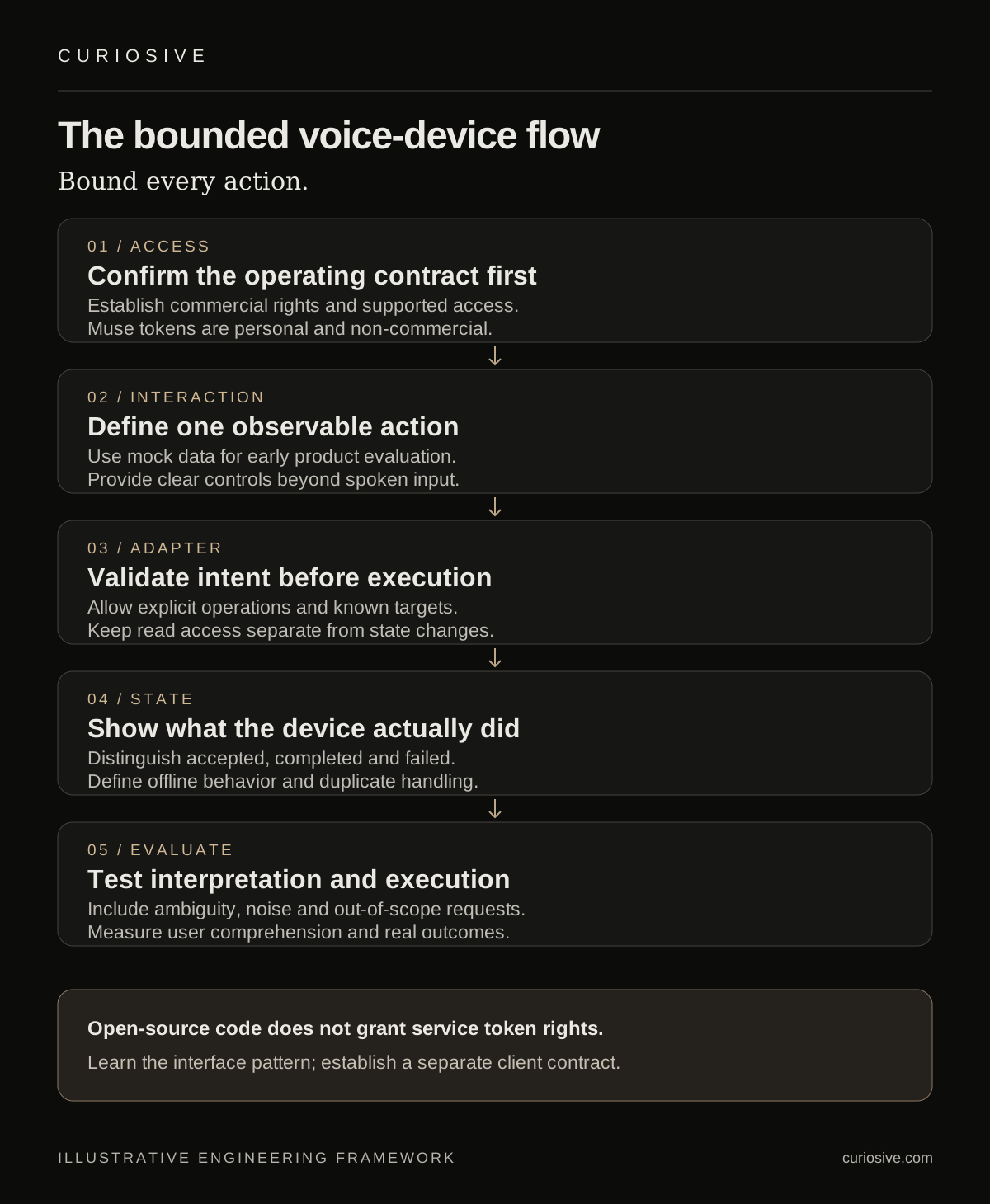
For a client project, this is a concrete planning boundary. Do not treat the current token program as a commercial integration entitlement, including for a paid client pilot. This article is not recommending that teams deploy Muse tokens in customer products.
The useful news is the interface pattern and what it takes to turn such a pattern into a client feature. A commercial implementation needs its own authorized service access and supported operating contract. Determine those prerequisites before committing a delivery plan or buying hardware for a rollout.
Start the client brief with one observable action
Consider an illustrative voice interface for a product demonstration: a user asks a tabletop display to show the current status of a simulated equipment queue. That is a narrow, inspectable interaction. It can test whether voice is a useful input method without granting control over real equipment.
Define the action in ordinary product terms. What exactly can change? What should the device display while it is processing? How does the user know the request failed? Which button or touch control provides an alternative to speech?
Voice is not automatically the right interface. In a noisy room, shared space or time-sensitive workflow, visible controls may be more reliable or easier to understand. A prototype should test the interaction, not assume conversational input improves it.
For an AI integration, the first deliverable can be a bounded interaction with mock data and a clear action contract. That lets a client evaluate the experience before considering broader permissions.
Put an action adapter between language and hardware
An authorized commercial architecture should translate interpreted intent into a small set of explicit operations. Keep device-specific execution behind a validated adapter.
For example, a proposed operation might request a display update with a known screen identifier and validated content. The adapter should reject unknown targets and invalid parameters. A language model should not gain unrestricted shell access merely because the feature accepts natural-language input.
Separate read-only status queries from state changes. Device and account permissions should reflect that separation. For consequential operations, use whatever confirmation and authorization the product’s actual task requires; do not rely on an ambiguous spoken response as the only evidence of permission.
This is our design recommendation, not a claim that the Muse SDK implements these controls for a client product.
Make device state visible to the user
Users need to distinguish listening, processing, awaiting authorization, acting and completed states. A voice response alone may be missed. Use an accessible visual or tactile signal where the device supports it, with a clear route to cancel or repeat the request.
Avoid treating “request accepted” as “action completed.” Show the actual device outcome. If the backend accepted a job but the device is offline, keep those states separate in the interface.
Design alternative input and output paths. A physical button can make starting or cancelling an interaction clear. Text can complement audio. Evaluate the real environment and users rather than requiring everyone to interact with the device in one way.
Offline behavior and retries belong in the prototype
A connected assistant can fail between interpretation and execution. The device might disconnect, a backend might time out or the same request might arrive twice. Define those states before expanding the feature.
Give state-changing operations identifiers so repeated delivery does not repeat the effect. Decide which requests can safely retry and which need a fresh user decision. Preserve a known device state after failure instead of presenting a confident success message.
Keep a manual path for the proposed workflow. A demonstration dependent on live AI should still explain what happens when the service is unavailable. Any local fallback needs its own supported capabilities; do not assume open-source firmware makes the connected model operate offline.
Our production AI architecture guide covers the surrounding reliability and cost controls. A physical interface adds another outcome to verify: what the device actually did.
Evaluate intent and action as separate steps
Build test cases for the narrow action vocabulary. Include unclear phrasing, repeated commands, interruptions, background noise and requests outside scope. Measure whether intent was interpreted correctly and whether the validated operation completed correctly.
Inspect cases where the system should decline or ask for clarification. A prototype that appears smooth only because it accepts every request is hiding a product problem.
Record end-to-end latency and user comprehension, not just model response time. Review microphone activation, data handling and visible status for the proposed product. Use simulated operations for early testing where real actions would complicate the evaluation.
Use the news to sharpen the product decision
Muse Gadgets offers an interesting view of voice AI connected to physical interfaces. The current token program remains a personal, non-commercial, unsupported offering. Client teams can learn from the interface ideas while keeping their commercial access and support requirements explicit.
If you are exploring a voice-driven product experience, bring the interaction brief to Curiosive. We can discuss the intended users, authorized actions and an AI integration evaluation around those requirements. Explore our work for product context.
Sources and scope
Reviewed October 3, 2026: Muse Gadgets, the official SDK repository, Linux documentation, token terms and HN discussion. The HN submission is dated October 2; the landing page does not supply a release date. Capabilities and terms are source-reported. Client interaction examples and architecture guidance are illustrative Curiosive recommendations, not tested Muse behavior or a commercial service promise.
Frequently asked questions
Are Muse Gadget SDK tokens available for commercial client products?
The reviewed token terms limit use to personal, non-commercial projects and impose distribution restrictions. Source-code licensing does not grant access rights to Muse tokens.
Does the Linux SDK have unrestricted permissions by default?
Its commands run with the permissions of the selected account. The documentation says an account with sudo gives Muse that capability too and describes selecting another account.
Put this into practice
Explore the services related to this article.
A short note about the product, the timeline and who it is for is enough to start. You will hear back from the engineer who would do the work, not a sales team.
Start a partnership