Web framework upgrades: a SvelteKit 3 checklist for existing products
- Web development
- SvelteKit
- Maintenance

A framework upgrade is successful when the product still serves its users and the team can operate it confidently. A passing installation or a rewritten import does not establish that sign-in, forms, public pages and production hosting behave as before. The practical question for a founder is which evidence makes the release worth scheduling.
SvelteKit 3 provides a timely example. Its migration tooling can reduce mechanical work, but an existing web product still needs a compatibility review and a release plan. This guide uses the published changes to explain how to scope a framework upgrade without turning it into an unnecessary redesign.
What SvelteKit 3 changes, and what remains experimental
The Svelte team published its SvelteKit 3 announcement on 1 October 2026. It describes a major release with changes to configuration, imports, environment handling and errors. It also says remote functions still require experimental support. The announcement describes tooling that migrates eligible code and produces outstanding tasks.
The official migration guide recommends updating to the latest 2.x release first to use its deprecation warnings. It lists minimum dependency versions, including Node 22.17, TypeScript 6, Svelte 5.57.1 and Vite 8.0.12. It also documents adapter-specific changes and differences in forms, cookies and redirects. Check the current guide when planning the work; these details are specific to this release.
The Hacker News discussion includes framework preferences and accounts of working with coding agents. Those comments are not comparative performance measurements. We are not claiming that migrating frameworks will make a particular application faster. The recommendations below concern upgrading an existing product, with illustrative checks rather than measured client outcomes.
Separate a framework upgrade from a framework rewrite
Updating the framework already used by an application and moving that application to a different framework are different projects. The first aims to preserve the product while changing its technical foundation. The second can require replacing routing, state, rendering and integration patterns. Combining them makes both the estimate and the source of a regression harder to understand.
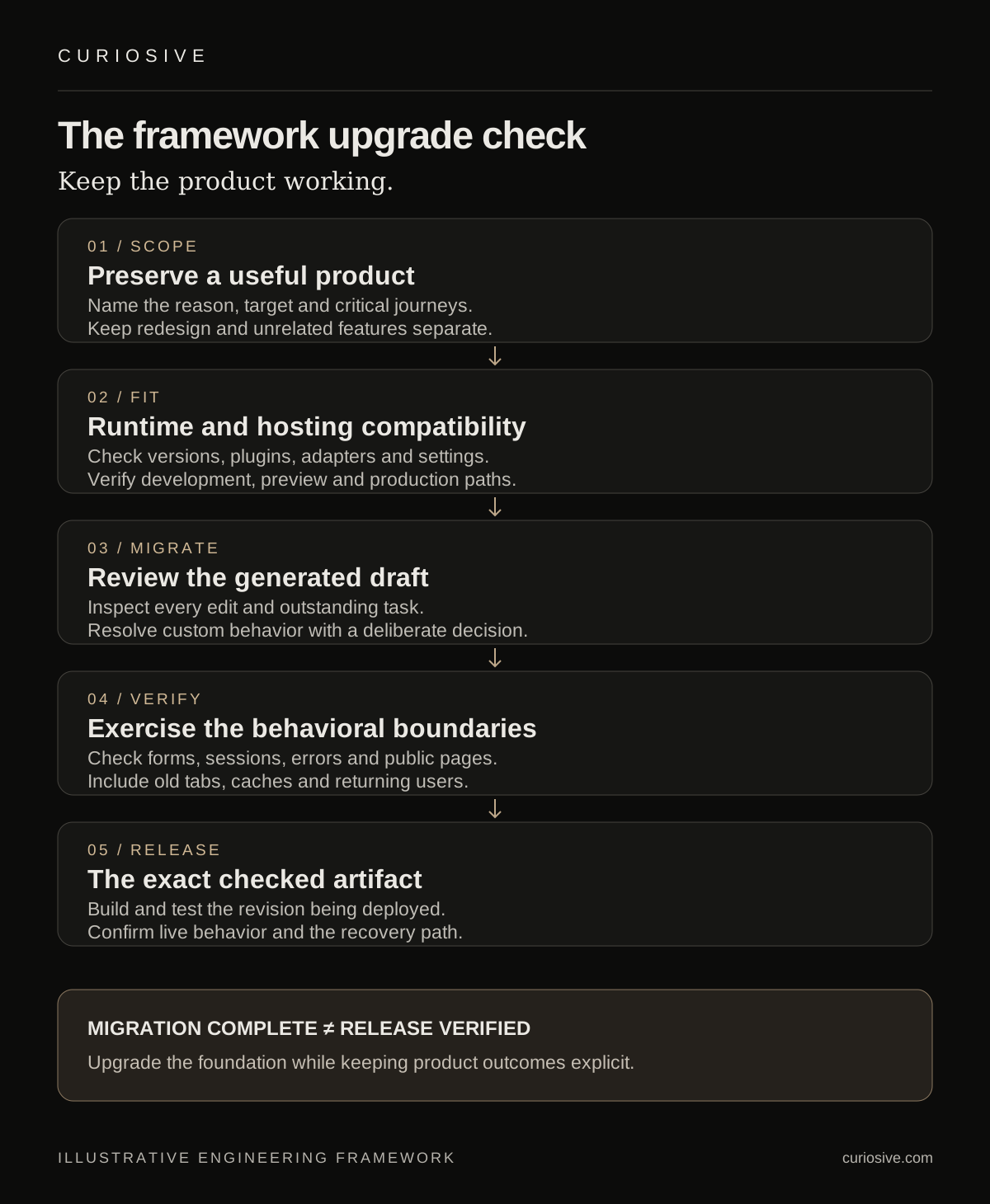
Write a short upgrade brief. Name the current versions, the target release, the reason to move and the behavior that should remain stable. A supported runtime requirement or a needed platform capability can be a concrete reason. A new release alone does not tell the team which week the migration belongs in.
Keep visible redesign work and unrelated feature requests out of the initial change. If an upgrade reveals a useful cleanup, record it with its own rationale. A smaller review surface gives the team a better chance of distinguishing an intentional migration change from an accidental product change.
For an illustrative customer portal, the acceptance criteria might cover signing in, inviting a colleague, editing a record and receiving a clear validation error. These are observable requirements. “Update all packages and fix the build” is a technical activity, not a complete description of the result.
Inventory the runtime and deployment path
List more than the framework package. Include the language runtime, compiler, build tool, plugins, adapter and packages that integrate directly with them. Record where the application runs in development, preview, continuous integration and production. A local runtime can satisfy a new minimum while the deployment builder still uses an older version.
Check the exact adapter and hosting arrangement. The SvelteKit 3 guide documents, for example, that its Vercel adapter no longer supports the edge runtime. That is a specific compatibility check for products using that path, not a reason to assume every Vercel application has the same migration work.
Inspect how environment settings enter the build and the running application. Public configuration and server-only credentials have different boundaries. A migration should preserve those boundaries and check the deployed artifact rather than relying on a variable name that looks private.
Include operational dependencies in the inventory: error reporting, scheduled jobs, reverse proxies, asset handling and any service worker. Assign an owner to unresolved compatibility questions. The goal is a short map of affected components, with evidence from the versions and configuration actually used by the product.
Use migration tooling as a draft
Run automated migration work in an isolated branch or checkout with a known baseline. Review the generated diff and every task it leaves behind. Do not treat a quiet command exit as proof that it understood the application’s business behavior.
Mechanical changes are well suited to automation when their scope is clear. Configuration moves and import updates may be straightforward. A custom adapter, unusual request handling or a hand-built authentication flow can require separate reasoning. Group those changes so the reviewer can see what was generated and what required a deliberate decision.
If a coding agent helps, give it the current migration guide, repository conventions and a bounded set of affected files. Ask it to identify uncertainty instead of inventing a compatible replacement. Generated code still needs to be checked against the project’s target versions and deployment environment.
Keep a reproducible record of the dependency resolution. The package manifest, lockfile and deployment runtime should describe a compatible set. Avoid mixing an upgrade with unreviewed package substitutions; each additional dependency change adds another possible cause when a test fails.
Test the product’s behavioral boundaries
Start with checks tied to the migration guide and the application’s critical journeys. For forms, verify both successful submission and invalid input. For authentication, verify access before sign-in, session renewal and sign-out. For a public website, inspect direct page loads, navigation, redirects and error pages.
SvelteKit 3’s guide documents changes to enhanced form responses and external redirects. A useful migration check therefore includes code that interprets submission status and code that sends users to another origin. Verify the intended result and permission boundary rather than broadly relaxing configuration until a test turns green.
Exercise failures deliberately in a controlled environment. An unavailable dependency, expired session or rejected input should produce the product’s expected outcome. Check that error reporting remains useful without sending private input or credentials into logs.
Use both automated tests and focused browser inspection. Automated checks can establish repeatable behavior for critical flows. A browser can reveal broken focus, confusing messages, missing content or a layout regression that an API response does not capture. Neither replaces the other where the product depends on both.
Check public pages and cached clients
A web application can serve more than one version during a release. A customer may keep a tab open while new assets are deployed. A service worker or browser cache may retain resources from the previous version. Test the update path when those mechanisms are part of the product.
For public pages, inspect the rendered title, description, canonical URL, meaningful headings and important internal links. Confirm that pages expected to be indexable remain reachable directly. Compare representative outputs from before and after the migration instead of assuming a successful client-side navigation proves the server output is intact.
For an application with stored browser state, check that a returning user can continue or receive a useful recovery instruction. Distinguish a version mismatch from an actual loss of data. Avoid using a blanket cache-clearing instruction as the product’s only recovery plan.
Measure any performance claim on the same representative workload and environment. A framework announcement cannot tell you how your authentication, data fetching or content affects the deployed result. Record conditions and uncertainty before turning a technical change into a customer-facing speed claim.
Release the exact artifact you checked
Build and test the intended commit with the production-like runtime and configuration. A working directory containing unrelated local edits is useful for development, but it can obscure what was actually validated. Keep the release evidence attached to the revision being deployed.
Choose a rollout proportional to the product’s usage and recovery requirements. Some applications can use a short scheduled release and a previous deployment for recovery. Others need a narrower exposure or additional operational coordination. Decide from the application’s actual constraints rather than assigning every upgrade the same ceremony.
Define what would trigger a rollback: a failed critical journey, unexpected authorization behavior or a sustained deployment error, for example. Check what reverting the application would mean for any accompanying data changes. If the migration requires a schema change, application rollback and data rollback need an explicit compatibility plan.
After deployment, inspect the live environment. Confirm the critical journeys, server responses, assets and error reporting. Keep a named person responsible for resolving the first observed regression. The release is complete when the tested behavior is present in production, not only when the deploy command finishes.
What to ask before approving an upgrade
- Which specific requirement or maintenance need does this release address?
- Which runtime, adapter and application behaviors are affected?
- What can the migration tool handle, and what remains a human decision?
- Which critical journeys were tested on the exact release revision?
- What is the recovery path if the deployed behavior changes unexpectedly?
A useful assessment can recommend scheduling the upgrade later after a compatibility issue is resolved. It can also show that the work is small and ready to ship. Either answer is more valuable when supported by a reviewed diff and product-level checks.
Plan a web upgrade around the product
Need to maintain an existing web application or move a prototype toward a dependable release? Explore Curiosive’s website development services and our engineering approach, or tell us about the current framework and the reason for the upgrade.
Bring the deployment setup, the product’s critical journeys and any constraint driving the timing. That gives the discussion a concrete scope before a dependency update becomes a larger rewrite.
Sources and scope
Read on 3 October 2026: the SvelteKit 3 announcement dated 1 October, the official migration guide and the HN discussion. Release facts are attributed to Svelte’s documentation. The upgrade workflow and examples are Curiosive’s analysis; no framework benchmark, client migration result or delivery-time promise is claimed.
Frequently asked questions
Does a migration command prove a framework upgrade is ready?
It can handle eligible mechanical edits and report remaining tasks. Readiness also requires compatible runtime and hosting dependencies, reviewed behavior, critical journey checks and live deployment verification.
Should an upgrade include a redesign?
Usually it is easier to assess an upgrade when it preserves product behavior and keeps redesign and unrelated features separate. Record useful cleanup with its own rationale.
Are SvelteKit 3 remote functions stable?
The 1 October 2026 announcement and migration guide still describe remote functions as experimental. Check current documentation and the exact configuration before using that path.
Put this into practice
Explore the services related to this article.
A short note about the product, the timeline and who it is for is enough to start. You will hear back from the engineer who would do the work, not a sales team.
Start a partnership