AI-assisted design to code: preserve client intent and reuse real components
- Agency workflow
- AI development
- Design to code

When a client approves a design, an AI-generated implementation should preserve more than its general appearance. The spacing system, repeated components, responsive behavior and interaction states all carry decisions the client has already made. If the agent guesses those details, the agency can end up reviewing a plausible new design instead of implementing the approved one.
The practical task is to translate design intent into the existing application’s components and behavior. This article recommends a design-to-code workflow for AI-assisted agency development. It is not a Curiosive client case study or a hands-on evaluation of Figma MCP or figma-server.
A current debate about agents and design access
figma-server appeared on Show HN on October 2, 2026. Its repository describes a prerelease browser-based bridge for agents, using a dedicated signed-in profile and browser control. The documentation explicitly notes that agents receive browser authority and that results can reach their model provider. This is the maintainer’s description, not an independently verified comparison or an endorsement of the repository’s criticism of Figma.
Figma’s official MCP introduction describes design-context extraction, selected-frame code generation and component reuse through Code Connect. It recommends its remote server and limits connections to clients in its MCP catalog. Access method, supported client and permissions are therefore implementation choices to confirm, rather than details to leave until an agent fails to connect.
The agency problem continues after access works: provide the right context and translate it into the client’s real codebase. The workflow below focuses on that problem and assumes an authorized, supported way to use the design information.
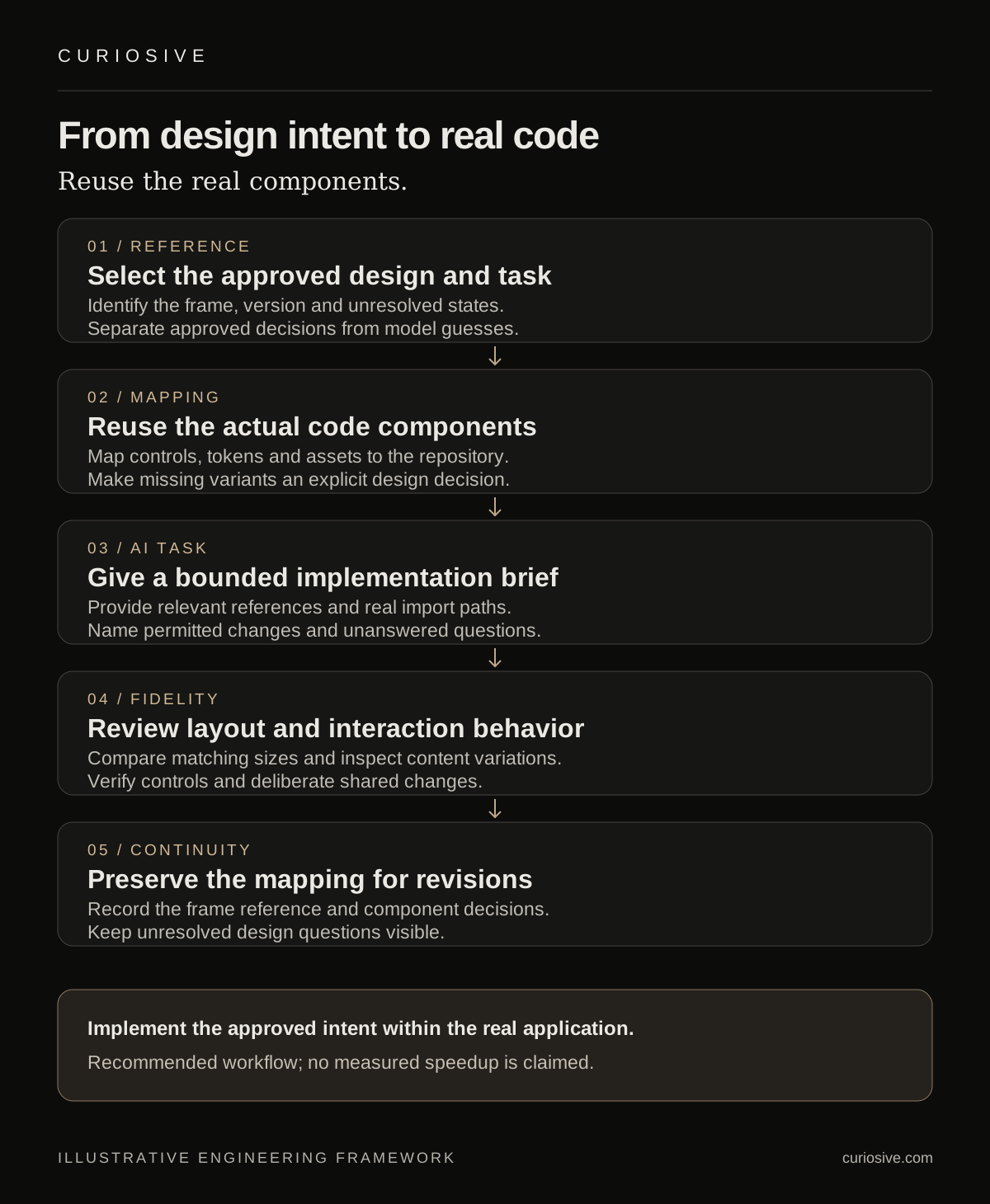
Identify the approved design and its missing decisions
Select the specific frame, version and user task being implemented. A large file may contain exploratory alternatives, outdated screens and unfinished states. Give the agent a clear reference to the approved part and keep proposals separate from accepted decisions.
Ask what the frame leaves unspecified. A desktop screenshot may not establish mobile navigation, long-content behavior, keyboard focus or a failed form submission. Record those questions for the designer or client rather than letting the model quietly invent answers.
For an illustrative appointment-request page, this might mean confirming whether the date control is a text input or calendar, what happens when no appointments are available and how the confirmation state appears. These are product decisions that influence implementation. The example is hypothetical; it does not describe a delivered Curiosive booking project.
Make repeated design elements map to real components
Figma’s file-structure guidance recommends components, variables, semantic names, Auto Layout and annotations to communicate intent. It also recommends linking design components to real code through Code Connect. Those are source recommendations, not a guarantee that generated code will meet the project’s requirements.
For the agency workflow, inspect the existing repository before generation. Find the components and tokens already used for buttons, inputs, navigation, containers and typography. Write a small mapping from the selected design elements to those actual implementations. Where a mapping is missing, mark it as a decision or a new component to design.
Give the agent concrete import paths and accepted examples from the application. Tell it which component owns behavior such as validation or focus handling. This reduces the opportunity to create a visually similar replacement with different interaction rules. The engineer still needs to verify that the imported component is used correctly.
Provide a bounded implementation brief
Limit the first task to one screen or coherent interaction. Include the approved reference, component mapping, relevant assets, responsive decisions and expected states. Define whether the agent may modify shared styles or must stay within the selected feature.
Ask for explicit questions where the design or repository does not provide enough information. A useful generated proposal can identify a missing mobile state or incompatible component variant before it changes shared code. That is a reviewable contribution, not evidence of a measured time saving.
Preserve asset provenance. An approved product image, logo or illustration should come from the designated source; a similar generated image may not be an acceptable substitute. Confirm the intended assets and their usage requirements before incorporating them into the implementation. Our separate AI asset workflow article covers creating and reviewing new assets when generation is actually part of the brief.
Translate layout intent into responsive behavior
A design frame is a useful reference for a particular size. The application also needs to handle narrower viewports, longer labels, content changes and the states its users can reach. Review those conditions against the agreed design intent.
Check whether the implementation uses the application’s layout system and tokens. Absolute positioning may recreate a frame while failing when text wraps. A locally invented spacing value may appear close while drifting from the shared system. Identify the source of each difference before asking the agent to make a cosmetic correction.
Use a comparison at matching dimensions to review the selected frame, then inspect additional conditions separately. Explain whether a difference is an implementation defect, an approved responsive adaptation or an unanswered design question. The purpose is to preserve decisions and expose gaps, rather than force every viewport to imitate one screenshot.
Review interaction fidelity alongside visual fidelity
Inspect the controls with representative input and keyboard use. A button should perform its agreed action, a label should identify the corresponding input and a failed submission should leave a useful recovery path. A rendered approximation does not establish those behaviors.
Give AI-assisted correction tasks the observed difference and relevant evidence. “The selected input component already exposes an error variant; use it for this failed state” is more actionable than asking the agent to make the page better. Review the resulting change against the component contract and the client’s task.
Keep shared component changes deliberate. A modification that improves one screen can affect other pages. If the design requires a new variant, define its purpose and review the affected usages. The agent should not replace the design system simply because generating a new control is easier than understanding the current one.
Preserve the mapping for future changes
Keep the implemented frame reference, component decisions and unresolved design questions near the feature documentation. When the client revises the design, that record helps identify which decisions changed and which application behavior should remain consistent.
The deliverable is an implemented user task that reflects approved design intent within the real application. AI assists with reading context, preparing code and proposing corrections; component ownership and design decisions still need explicit review.
Have an approved design or AI-generated screen that needs to fit an existing website? Contact Curiosive with the design reference and application context. We can discuss a defined implementation scope through our website development services and existing engagement options.
Frequently asked questions
Why map design elements to existing code components?
An explicit mapping helps AI-assisted implementation use the application’s real controls, tokens and behavior instead of inventing similar replacements.
Does a matching screenshot establish interaction fidelity?
No. Responsive content, keyboard use, input states and recovery behavior need their own review against agreed requirements.
Did Curiosive test figma-server or Figma MCP for this article?
No. The article uses documented source context and recommends a workflow, without claiming a hands-on tool evaluation.
Put this into practice
Explore the services related to this article.
A short note about the product, the timeline and who it is for is enough to start. You will hear back from the engineer who would do the work, not a sales team.
Start a partnership