AI-generated client portals: a practical production handover review
- Agency workflow
- AI websites
- Client portals

An AI-generated client portal can make a proposed service tangible: clients see where documents go, how status appears and what a request looks like. Before handing it over, the agency still needs to answer a different set of questions. Who can see saved information? Which account supplies connected data? What happens when a client leaves? Who can publish the next change?
Those questions define the operating agreement behind the interface. This article proposes a practical prototype-to-production review for an agency-built client portal. It is a recommended workflow, not a Curiosive client case study or a hands-on evaluation of ChatGPT Sites.
Why AI site builders make the handover more important
OpenAI’s Sites feature page describes creating, reviewing and publishing websites through ChatGPT, with sharing controls, sign-in and storage for information and uploaded files. In eligible Business and Enterprise workspaces, connected-tool access uses the visitor’s own connections and permissions; it is read-only. That connected information is unavailable to background scheduled tasks. Workspace editors can access saved Site data and publish updates after the owner’s first publication. External viewers cannot edit. Access and limits vary during public beta.
The feature appeared in a Hacker News discussion on October 1, 2026. The official page reviewed on October 3 is undated, so that discussion date should not be treated as a confirmed launch date. These documented boundaries offer concrete review questions; they do not establish whether a particular client portal meets its requirements.
For an agency, the useful next step is to turn the proposed experience into a handover contract: people, information, supported actions and continuing ownership. The review below applies across AI-assisted website development, with platform-specific behavior checked against the chosen implementation.
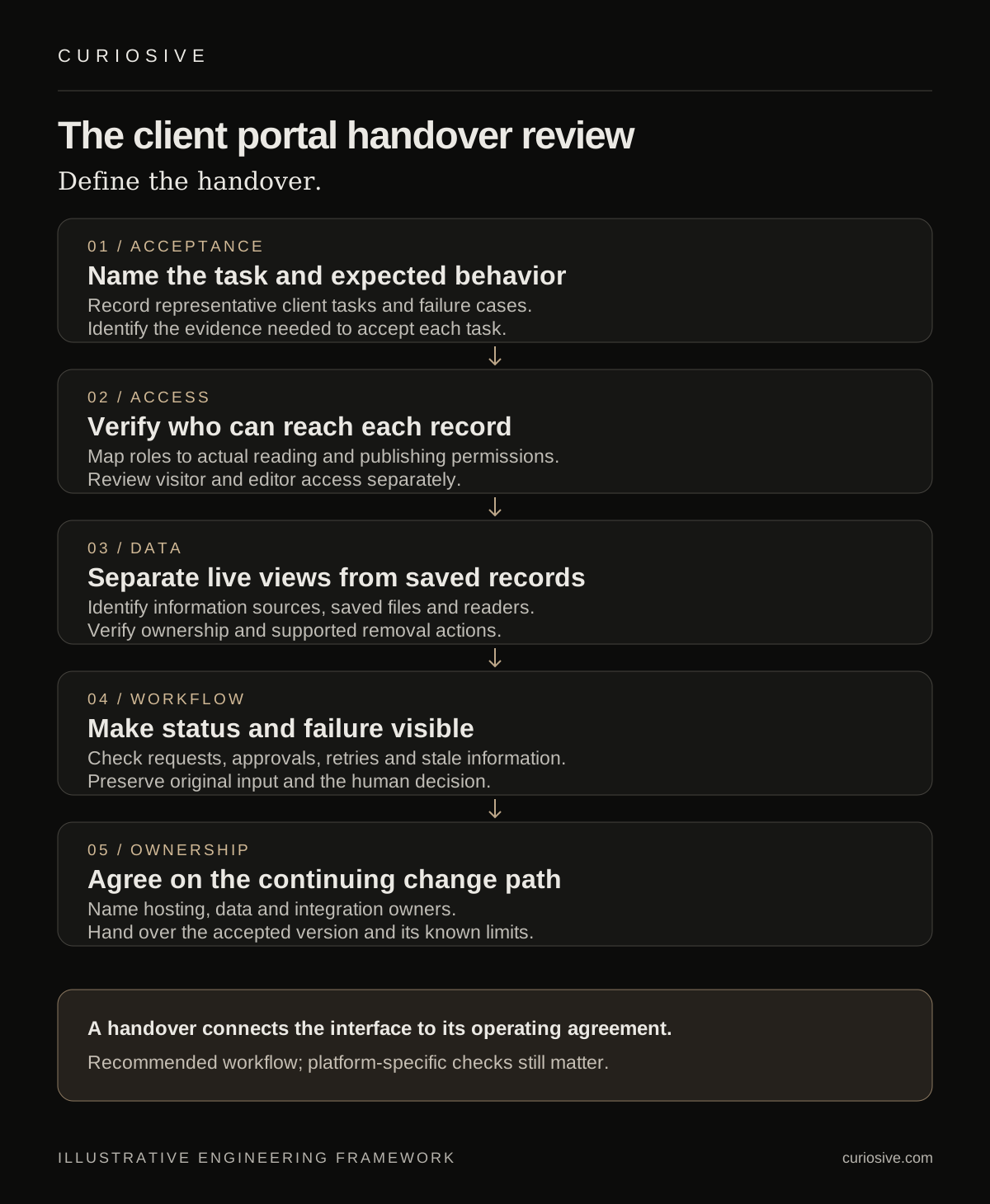
Start with a client task and an acceptance record
Consider an illustrative portal where a client uploads an approved project document, sees a delivery status and requests a change. Before reviewing the visual design, write down what each action means. Is an upload immediately visible to an editor? Does requesting a change create a draft, a notification or a record in another system? Does a displayed status come from an authoritative source or manually entered information?
Give each task an acceptance example. A client can find the latest approved document. A reviewer can identify a new request without searching through unrelated projects. A removed user loses access to the intended information. An unavailable integration produces a useful explanation instead of a misleading empty dashboard.
Record the expected behavior beside the evidence needed to accept it. Screenshots can support a design review; they cannot establish the full access boundary. Use a short task list and representative accounts so the client reviews a working path, including failures, rather than only a polished presentation.
Review access at the information boundary
Define the people involved: client viewer, client contributor, agency reviewer, publisher and system owner. For each role, list what it can read, save, change and publish. Then map those actions to the actual platform permissions. A label in the interface is not evidence that the underlying permission exists.
Use representative test accounts and approved sample information. Check whether one client can reach another client’s record through a direct link, an identifier change or a shared search. Review editor access separately from visitor access. An editor who maintains the application may have wider visibility than the customer-facing screen suggests.
Do not assume a workspace automatically provides separation between individual client projects. If the chosen platform cannot express the required boundary, change the design or choose a different implementation. Document the limitation before real client information enters the system. This is an implementation decision to verify, not a universal claim about any one AI builder.
Separate a live view from saved client data
A portal can show information from a connected service and also save its own records. Those are different data paths. Write down which fields are fetched when a visitor opens a screen, which files are uploaded and which values remain stored after the session ends.
For each saved category, identify the purpose, permitted readers, owner and removal process. A useful review asks what happens when a person leaves the project, when a document is replaced and when the client ends the engagement. Verify the actual supported actions instead of promising an export, retention policy or deletion capability that has not been established.
For integrations, identify the account and authority behind every read or write. A client’s interactive connection may not support an unattended report. A displayed approval button may need a separate write-capable service. If the proposed workflow needs that capability, scope it explicitly through AI integration work, including the action owner and failure behavior.
Make workflow state observable
Clients need to know whether a request was saved, is awaiting review, was accepted or failed. Define those states in plain language and identify the source responsible for each transition. Avoid letting an AI-generated interface imply completion simply because it displayed a success animation.
Review interrupted uploads, repeat submissions, stale information and dependency failures. Where a retry can repeat an external action, determine how the implementation recognizes the original request. Where an action needs approval, preserve a human review step and make the pending state visible.
Keep AI assistance bounded by the task. A model may summarize a request for the reviewer, but the client should still be able to inspect the original input. An AI-generated recommendation should not silently become an agreed project change. The handover needs to explain where judgment sits and how a person corrects an error.
Hand over ownership and a change path
The delivery package should identify who owns the hosting account, domain, saved records, integration configuration and published application. Confirm that the receiving team can perform the expected maintenance action with its own access. A walkthrough by the original creator does not demonstrate that the client can operate the result independently.
Record how a change is reviewed and released. Include the accepted version, relevant checks, unresolved limitations and a recovery path supported by the implementation. Define who handles access requests, broken connections and requests for new features. These responsibilities should match the agreed engagement; they should not emerge accidentally from whoever first generated the site.
For a custom application, this review can inform SaaS development. For a narrower portal, it may reveal that a simpler workflow meets the need. The decision should follow the actual access and operational requirements, with agreed scope and service terms.
Decide whether the portal is ready for its intended use
Close the review with an explicit decision: accepted for a defined use, accepted with documented limits, or waiting on named requirements. Include an owner and next action for every unresolved item. A client should be able to see what was accepted and what remains outside the handover.
The point is to make an AI-assisted prototype useful beyond its first demonstration. A clear operating agreement connects the interface to the people, information and maintenance work that sustain it.
Have a portal prototype or a client workflow to review? Contact Curiosive with the intended users, representative tasks and current platform. We can discuss an appropriate scope for the next step through our existing services and pricing.
Frequently asked questions
Does this article describe a tested Curiosive client portal?
No. It proposes a review workflow and an illustrative portal task. It does not claim a client implementation or a hands-on Sites evaluation.
What should an agency review before handing over an AI-generated portal?
Review acceptance evidence, actual access permissions, live and saved data paths, workflow failure states, and continuing ownership.
Put this into practice
Explore the services related to this article.
A short note about the product, the timeline and who it is for is enough to start. You will hear back from the engineer who would do the work, not a sales team.
Start a partnership