Browser extension updates: a release checklist for existing users
- Browser extensions
- Release engineering
- Manifest V3
- Product maintenance

A browser extension can work on a clean developer profile and still fail for people who already use it. Existing users bring saved preferences, older data formats, previously granted access and open host pages into the next version. A release brief should explain what happens to that installed state, not only show that the new popup opens.
This guide is for US, UK and European product teams commissioning an extension update or taking over maintenance. It supplies a buyer's acceptance checklist and a fictional version-one-to-version-two rehearsal. It is not a report of a client migration, a store approval guarantee or a claim about search demand.
Separate delivered extension work from the proposed rehearsal
Curiosive's Detailed SEO Extension case, recorded in the United Kingdom, describes page inspection, captured response-header signals, exports and maintenance through its acquisition by Ahrefs. The published implementation uses Vue and JavaScript with separate Chrome and Firefox manifests. It supports experience maintaining a browser tool across real-world pages. It does not establish the storage migration or background-restart tests proposed here.
The PastorsLine case, recorded in the United States, covers React extensions for Chrome, Safari, Firefox, Edge and Opera that connect communication workflows to existing browser tools. That is cross-browser delivery evidence. The new release packet below does not claim to reproduce PastorsLine's historical implementation, sending behavior or permission changes. Keep the actual project scope beside any proposed acceptance plan when comparing suppliers.
Describe the users and installed versions that must keep working
Ask for a short release inventory: supported browsers and operating systems, current distributed versions, package identifiers, host websites and the task each version completes. Record whether the buyer owns the store listings and who is authorized to prepare, review and publish each package. Store ownership and access should be confirmed through the existing owner; they should not be inferred from possession of a source folder.
Choose the upgrade paths the release will support. A fresh install, an update from the current version and an update from an older supported version are different fixtures. Use fictional data in isolated test profiles prepared through the browser's supported process. Reinstalling from scratch can erase the very state an upgrade test needs, so a clean demonstration should not stand in for an installed-user rehearsal.
Give stored data its own version and acceptance rule
Inventory what the extension retains: preferences, selected fields, unfinished work and any references to an account or host page. Define which values remain meaningful after the update, which need conversion and which are deliberately retired. Package version and stored-data format are separate identifiers. Record the input format, conversion result and how an incomplete migration is detected before later code treats the data as current.
Chrome's runtime API documents an installation event for first installation, extension updates and Chrome updates, with details describing the reason and previous extension version where applicable. The handler therefore needs an intentional install-versus-update policy. A product should not reset a person's existing preferences merely because initialization runs again. The data's format and migration status still need to be checked against the chosen implementation.
Agree what happens to unknown fields and unsupported old formats. Preserve the approved source state or provide the agreed recovery path before destructive conversion. Ask the maintainer to show an interrupted conversion and a repeated attempt using the same fixture. This is a proposed product rule, not a statement that every browser provides an automatic transaction or a reversible migration across all storage mechanisms.
Rehearse background shutdown without erasing saved work
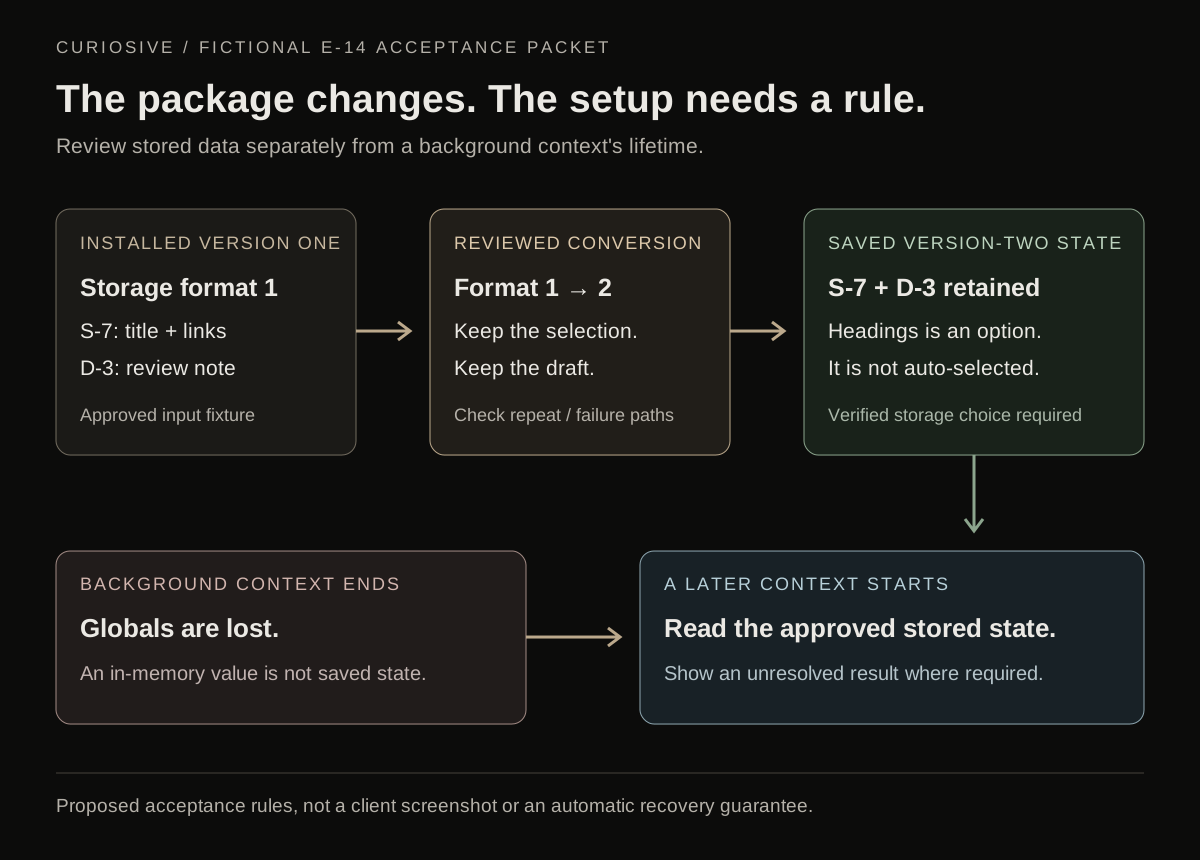
Chrome's extension service worker lifecycle explains that a worker can shut down and that its global variables are lost. It recommends persisting needed state in appropriate storage and designing for unexpected termination. A promise, timer or in-memory array should not be treated as the product's durable record simply because it survived a short demonstration.
For the agreed workflow, identify what is saved before the background context ends and what a later context reads back. Test opening and closing the popup separately from restarting the background context. Define the visible state when recovery is incomplete. If the product starts external work, such as publishing or communication, agree how its recorded result is checked before another action is offered; restarting a worker should not silently replay a side effect.
Worker startup and an extension update are also different events. Loading existing state after a restart should follow its documented format, not act as an unplanned fresh installation. Choose the actual storage mechanism and its lifetime deliberately. This guide does not promise that all stored values survive uninstall, profile removal, synchronization changes or every device failure.
Review permission changes as part of the upgrade
Compare the old and new manifests with the product owner. For each changed capability or host, name the feature that requires it and the user action that explains it. Test the existing grant, a declined request and unavailable host access as separate outcomes. The interface should distinguish access it does not have from a successful inspection that found no data.
Chrome's permission-warning guidance says that adding a permission that triggers a warning can disable an extension until the user accepts the new permission. It also describes optional permissions requested in the context of a feature. These are release behaviors to assess in the supported browser and version, not a reason to assume every update asks for the same access. An unchanged permission list and an accepted permission grant are different evidence.
Keep a usable explanation for an action that cannot proceed. A release should not depend on testers overriding a user's denial, browser policy or an unsupported page. Broader access is a product decision requiring its own justification and review; a test failure is not permission to bypass the boundary.
Verify the actual package on each named browser
A shared interface does not make every background environment identical. Mozilla's background-manifest documentation describes differences between background scripts and service workers, including Firefox's lack of support for the background.service_worker property at the time checked. Check the compatibility notes against the actual supported versions rather than treating a Chrome build as proof for Firefox or Safari.
Apple's Safari distribution guide describes distributing a Safari web extension in a containing app and the signing and distribution responsibilities for supported Apple platforms. Assign those responsibilities to the existing authorized owner. A browser package, its containing app where required and its store listing should be identified in the release record. A successful local build does not establish store approval or a publication date.
Run the same complete user task on each reviewed package. Include a representative host page that has changed its layout and one that is outside the supported scope. Record expected behavior for unavailable targets instead of reporting a universal pass. The extension development service scopes host integration, account boundaries and maintenance; this guide adds acceptance of the installed version's next release.
Use a small installed-user acceptance packet
For fictional extension E-14, prepare an approved version-one profile with saved setup S-7: the selected fields are title and links, and an unfinished local review note is D-3. Version two changes the preferences format and adds headings as an available field. The agreed policy preserves the existing selection and draft; it does not automatically select the newly available field.
- Fresh install: version two shows its approved defaults with no invented prior setup or draft. Record this result separately from the upgrade fixture.
- Current-version upgrade: update the version-one fixture through the supported test path. S-7 still selects title and links, D-3 remains available to its author, and the stored format is the agreed version two. A new option is available without rewriting the person's selection.
- Repeated initialization: run the relevant initialization or recovery path again. The saved selection and draft follow the same policy instead of being reset, duplicated or converted a second time without checking their format.
- Background restart: end the relevant background context in the controlled test environment, then reopen the workflow. Recovery reads the saved version-two state. Any unresolved operation has the agreed visible status; it is not silently declared complete or repeated.
- Unavailable access: the selected test page cannot be inspected under the current grant or policy. The tool explains the unavailable action and preserves the person's saved setup. It does not label unavailable evidence as a confirmed empty result.
- Recovery release: try the agreed recovery package or forward-fix procedure against the state version two wrote. Verify whether that code can read the data before promising a downgrade. Removing and reinstalling the extension is not equivalent to preserving installed-user state.
Repeat the applicable cases for every named browser package and record the differences. The identifiers, preferences and checks are fictional proposed requirements. They are not screenshots, observed tests or extra delivered capabilities of Detailed or PastorsLine.
Hand over the release and the recovery procedure together
A useful handover contains the package version and source commit, supported browser matrix, old and new manifest comparison, stored-data formats, approved fixture results and the person authorizing publication. Include a correction procedure with a clear decision point: pause further rollout where the platform allows it, issue a forward fix, or use another supported recovery route. The available store controls must be confirmed for the actual distribution path; do not promise an immediate downgrade everywhere.
Keep support diagnostics focused on the affected build, browser, state-format version and an approved non-secret reference. A release record should make it possible to reproduce the fixture without copying a customer's private host-page content into ordinary logs. Define what the support team can request and who owns investigation when a host site changes after launch.
Curiosive works remotely with engineering led from Ankara, Türkiye. For a maintenance brief, bring the existing repository, authorized store owner, supported host pages and a fictional installed profile. Explore browser extension development and full stack development when the extension connects to a maintained backend. The UK content and browser-product page and US engineering scope hub give relevant published project context without implying additional local offices.
Sources and scope
Primary documentation checked on 16 October 2026: Chrome's runtime installation event, service worker lifecycle and permission warnings; Mozilla's background-manifest compatibility notes; and Apple's Safari distribution guide, linked beside their claims. The acceptance packet, migration questions and procurement recommendations are Curiosive's analysis. No historical Manifest V3 migration, customer retention result, browser-store approval, security certification or search-performance increase is inferred from the cited projects.
Frequently asked questions
Why is a fresh install insufficient for an extension update?
An existing user brings saved preferences, older data formats, previous access grants and open host pages. Test the supported upgrade paths with an approved installed profile. A clean install can pass while the update resets data or cannot interpret the stored format.
Will a Chrome service worker keep in-memory progress after it stops?
Chrome documents that global variables are lost when an extension service worker shuts down. Define which state is persisted, which storage lifetime applies and how a later context reads it. A live worker in a short demonstration does not establish durable recovery or an offline queue.
Can a permission change interrupt an existing installation?
Chrome documents that adding a permission that triggers a warning can disable the extension until the user accepts it. Compare manifests and test the actual update on supported versions. Keep declined access and an inspected page with no matching data as different outcomes.
Does a shared codebase prove the same package works in every browser?
No. Background environments, supported manifest properties, packaging and distribution vary. Run the agreed installed-user cases on each named browser package, including any containing app required for the chosen Safari distribution path. Local build success does not establish store approval.
Does reverting the code automatically restore the previous stored data?
No. Confirm that the proposed recovery code can interpret the state the update wrote. Data conversion, store distribution and code recovery are separate concerns. Rehearse the supported correction or forward-fix procedure rather than promising an immediate downgrade or treating reinstall as data preservation.
Which portfolio work supports this guide?
Detailed SEO Extension is recorded in the United Kingdom and demonstrates browser inspection, exports and maintenance with separate Chrome and Firefox manifests. PastorsLine is recorded in the United States and demonstrates five-browser extension delivery. The fictional E-14 upgrade, storage conversion and recovery packet are proposed requirements, not claims about those projects' historical migrations or tests.
Put this into practice
Explore the services related to this article.
A short note about the product, the timeline and who it is for is enough to start. You will hear back from the engineer who would do the work, not a sales team.
Start a partnership