WordPress to Next.js

WordPress to Next.js migration

WordPress runs an enormous share of the web and there are good reasons for that: a mature editing experience, a huge plugin ecosystem and an interface content teams already know. When comparing it with Next.js, the right question is not which one is better, but which one is strong where your content and product needs actually sit.

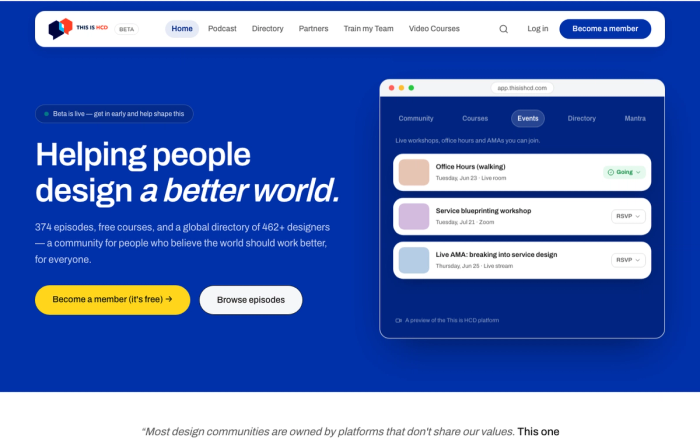
We build content-led sites with Next.js and Sanity. Miray Yapım's bilingual site is a live example of the approach, and at This is HCD a 374-episode archive is managed under the same roof with Sanity and Supabase. Below is when a migration genuinely pays for itself and when you should stay on WordPress.

01

When you should stay on WordPress

If your site is mostly blog, news or corporate content and your editors work productively in the WordPress interface, there is no hurry. A multi-author publishing flow, draft and approval steps, and plugins that have become habits all cost real money to rebuild. Without a team that writes software, moving to a codebase means depending on someone external for every small change. Moving a straightforward corporate site to Next.js feels modern but does not change the business outcome.

02

Headless WordPress: the third option

Not every decision is binary. You can leave WordPress as the content management layer and build the front end in Next.js. Editors keep working in the panel they know, while you control rendering strategy, caching, meta tags and page speed on the front end. This route makes particular sense for publishers with large archives, because the content migration risk disappears entirely. In exchange, you accept running two systems and maintaining the API layer between them.

03

Rebuilding the content model in Sanity

In a full migration, the critical work is the content model, not the templates. Structure that has accumulated in WordPress over years through custom fields, shortcodes and page builders is usually undocumented. When we redefine it in a headless CMS like Sanity, we write out content types, relationships and language variants explicitly. Miray Yapım's bilingual site was built this way, and at This is HCD, Sanity and Supabase are used together so content and user data sit in separate layers. Writing templates before the model is settled is the most expensive mistake in a migration.

04

Plugin maintenance, security and traffic

The practical reasons that justify a migration are usually these: a stack of plugins that constantly need updates and conflict with each other, repeated security patches, bloated markup produced by page builders, and stacking cache layers on top of one another whenever traffic climbs. Needs that cross into product territory count too: your own user login, account screens running on a real database, payment flows. These can be solved with plugins, but every plugin is a standing maintenance debt. That debt becomes more visible and more manageable on the Next.js side when your team can genuinely write code.

Proof

Products we shipped with exactly this.

Questions

The things people ask before starting.

Do I have to move from WordPress to Next.js?

No. If you run a content-led site, your editors are productive in the current flow and you do not need in-product features, WordPress is exactly where it should be. Base the decision on concrete limits: user login, database needs, a performance ceiling or plugin maintenance load.

What happens to the blog archive I have built up over years?

The archive can move. We map content types, import the posts into a headless CMS, move media files to new storage and build a redirect table for every old address. Alternatively you can keep WordPress as the content layer and rebuild only the front end.

Is a Next.js site automatically faster than WordPress?

Not automatically. Next.js gives you control over rendering and caching, but a poorly built Next.js site can be slower than a well-tuned WordPress install. The difference comes from image optimisation, data fetching strategy and removing unnecessary client code.

What does a migration cost?

It becomes clear after a discovery call. Content-led site migrations start from $2,000, scopes requiring user login and a database from $5,000, and full application work from $10,000. For after launch there is a 20-hour maintenance option at $800 a month.

Contact

Looking for an engineering partner for the long haul?

A short note about the product, the timeline and who it is for is enough to start. You will hear back from the engineer who would do the work, not a sales team.

Ankara / Türkiye · Working across European and US time zones